WSO2 is now Choreo LabsLearn more

Trusted AI Governance
Build

Create agents and AI apps with the tools and languages your teams already use.

Connect

Link agents securely to your APIs, data, models and business systems.

Run

Deploy, observe and operate agents and AI apps reliably at any scale.

Govern

Control identity, access, cost and policy for every agent in production.

Agent Management

Developer Platform

  • API Management Cloud

    Design, secure and publish APIs with governance and analytics built in.

    Sign Up Now
  • Integration Cloud

    Connect apps, data and AI agents with low-code and pro-code integration.

    Sign Up Now
  • Identity & Access Management Cloud

    Secure sign-in and access for customers, partners, workforce and agents.

    Sign Up Now
  • Agent Management Cloud

    Build, run and govern AI agents with full visibility and control.

    Sign Up Now
  • Developer Platform Cloud

    Ship cloud-native apps faster on an internal developer platform.

    Sign Up Now

Self-Hosted

Full control over your stack. Deploy directly to your own servers, bare metal, cloud, or Kubernetes environment. Your data never leaves your perimeter.

Product Downloads
Choreo Labs
AI Governance
Platform
Solutions
Resources
Blog

Display the latest or all versions of an API

By default, API Cloud's Developer Portal only displays the latest published version of each API.

So once version 2.0 of an API gets published, version 1.0 gets automatically hidden from the Developer Portal (existing subscriptions still work though until you block the API.)

This way you can make sure that all your new subscribers pick the latest and greatest of your APIs. You can see the video and read more about how API lifecycle works in this tutorial.

However, all API programs are different and you might decide that you want all published versions of your APIs shown to your subscribers. To do that, you need to set the DisplayMultipleVersions flag to true as described in API Cloud's documentation.
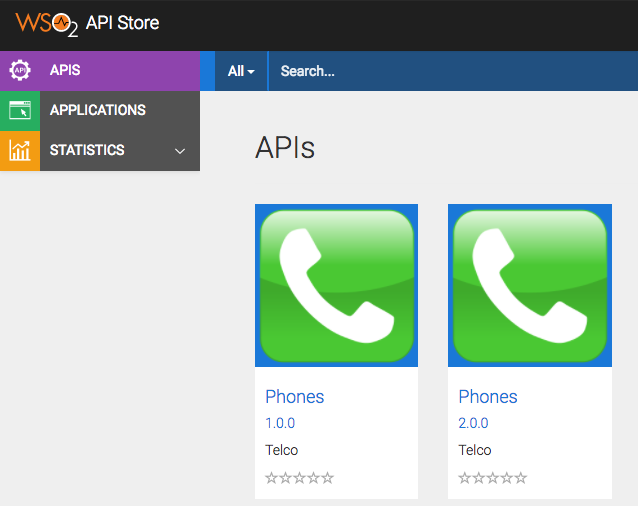
Notes:

  • It might take about 15 minutes before the changes apply to your store and the older versions start showing up,
  • Even with this flag, deprecated versions are still hidden. If you want API Cloud to also show deprecated APIs set the DisplayAllAPIs to true too.