

Hiding APIs from developer portal

API Cloud lets you control not only who can subscribe to your APIs and invoke them, but even who sees each of the APIs in your API Store (Developer Portal).
The visibility level is set on the first step of the API editing and there are three levels available:
- Public,
- Visible to my domain,
- Restricted by roles
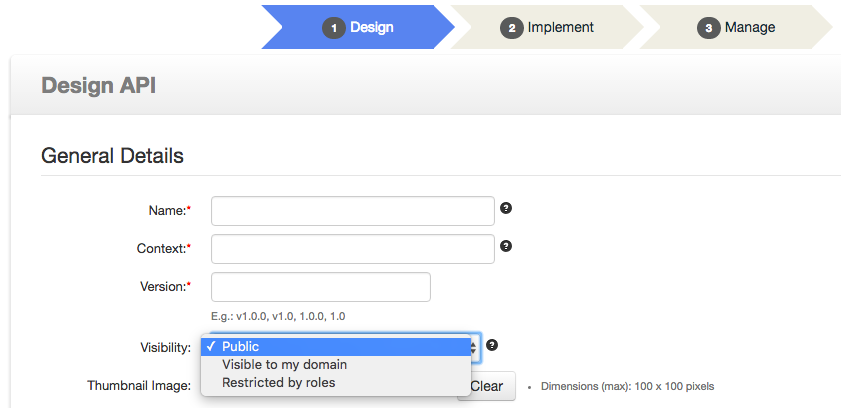
Public
Public visibility means that the API will be shown on the Developer Portal to everyone, including not authenticated site visitors.
This is the mode most frequently used for public API programs when you want to have everything available on the website and indexed by search engines, so your API program can attract as big of a community as possible.
Visible to my domain
This option basically means "authenticated users". Only people who log into your portal can see APIs with this visibility level.
Note that you can control who can do this because the only ways to get an account are to either get explicitly invited by you or to go through self-signup, and the self-signup feature is off by default and can be configured to require approval.
Restricted by roles
This is the strictest visibility control option that lets you narrow down API visibility to a specific group of users.
For example, before making an API publicly visible, you can limit its access to internal developers and quality assurance team.
Or you might have a scenario in which some APIs are visible to the wide ecosystem, more APIs are available to select close partners, and even more are being used internally.
Notes:
- If you want to use default roles for the visibility - note that their internal names are different from the display names being used in the Members dialog box. So if you want to restrict visibility to publishers only (Members dialog box calls this group:
APICloudPublisher) restrict access topublisherrole. APICloudSubscriberrole is internally simply calledsubscriberbut, in reality, you would rarely use it for restrictions by roles because in most cases the effect of that level of visibility is identical to simply setting Visible to my domain.
Note: API Versions
This visibility control system can be very powerful in combination with API versioning because Visibility setting is applied on the individual version level. For example, you might have version 1.0 of an API Publicly visible, and at the same time only have version 2.0 visible to your Quality Assurance and Beta Testers group, and version 3.0 only visible to Internal Developers.