

How to avoid your backend endpoint getting suspended by the API gateway

When invoking an API published in API Cloud, you might have seen the following error response:
<am:fault xmlns:am="https://wso2.org/apimanager"><am:code>303001</am:code><am:type>Status report</am:type><am:message>Runtime Error</am:message><am:description>Currently , Address endpoint : [ Name :Â somename-AT-sometenant--test_me_APIproductionEndpoint_0 ] [ State :Â SUSPENDEDÂ ]</am:description></am:fault>
As you can see from the message above, the endpoint got suspended. By default, gateway suspends API for 30 seconds when it cannot reach the endpoint. So, if another request comes to your API within that 30 seconds, it won't be sent to the backend, rather an error response similar to above will be sent back to the client.
If this is not the behavior you want, these rules are simple to modify:
1. Go to API Publisher and select the API that you want to change. Then click Edit from API Overview
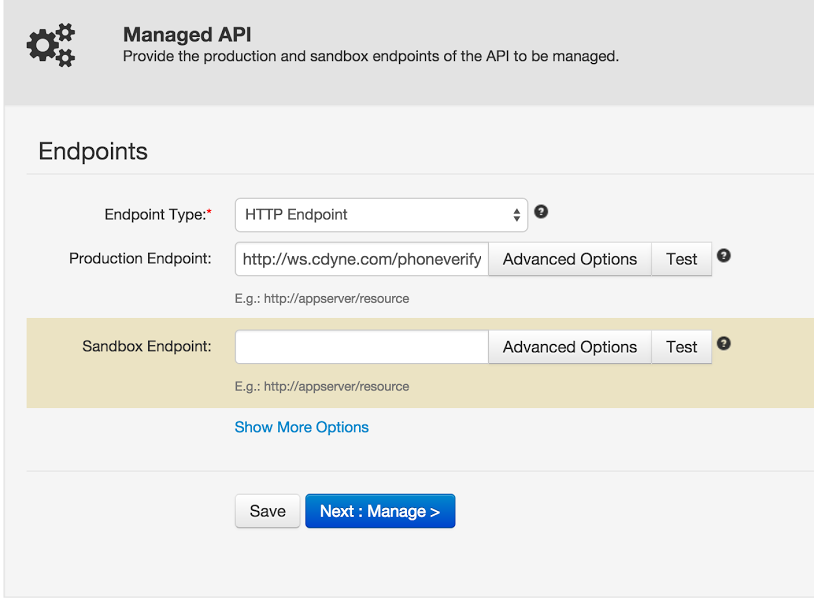
2. Under the Implement tab, select Advanced Options on the endpoint which you want to re-configure.
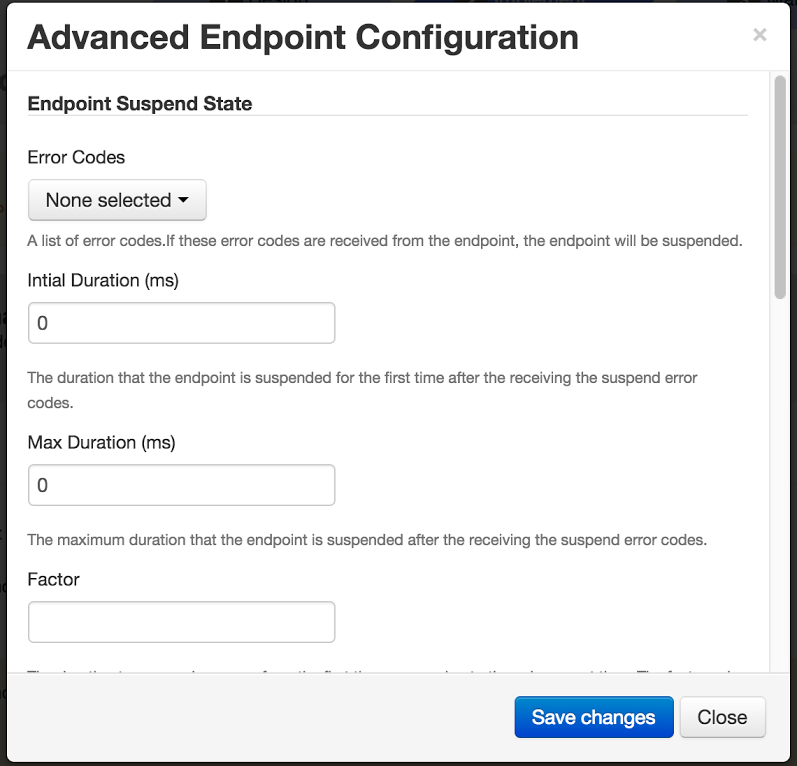
3. Modify the values. If you want to disable the suspension rules, set both Initial Duration and Max Duration to 0:
4. Save changes and re-publish the API.
This way you can tweak the suspension rules or completely disable the mechanism and thus prevent your API from ever getting suspended by the API gateway.
Try it today in WSO2 API Cloud!