

How to synchronize new Salesforce leads to Google sheets and get gmail notifications using WSO2 connectors

WSO2 provides Connectors dedicated to the most popular business-critical services that you will need such as SalesForce, Amazon, Twitter, Google, SAP & Microsoft Dynamics. You can simply download the required connector from the WSO2 Connector Store and plug it into your integration flow with just a few clicks.
One such simple solution is exporting Salesforce leads to Google sheets. This lets you create your own Customer relationship management (CRM) system and a sales pipeline based on your email data. You can even use this information to send customized mailers to selected target groups.
Let's take a look at how you can use the Salesforce SOAP connector to get details of new leads to use the Google Spreadsheet connector to add that information to a spreadsheet.
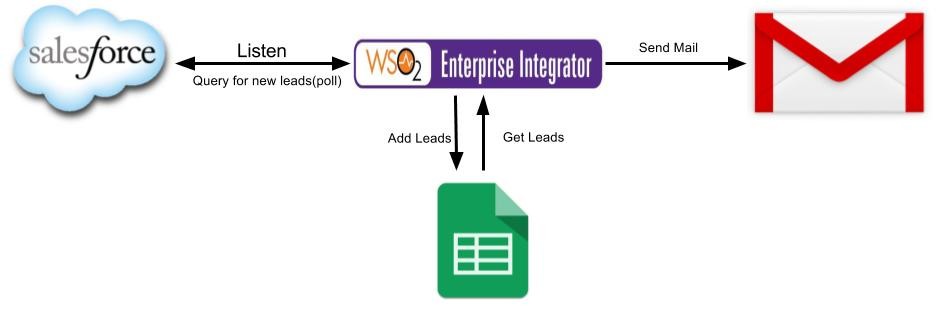
This is a pre-built solution. The required artifacts can be downloaded via the WSO2 Store. *You can even take a look at the source code here.
- To customize this solution for your own salesforce account, google docs, you have to configure the salesforce and google docs accordingly and obtain the required credentials.
- You can download the sample json file with default values. Update the json file with the credentials extracted in above step.
- You can deploy the solution in Integration Cloud using the artifacts downloaded in step1 and the environment variable json file modified in step3.
- Finally, to test this scenario create a new lead in Salesforce.
Your spreadsheet gets updated with the information you provided when creating the new lead and an email notification will be generated.
You can extend this solution by using the WSO2 Developer Studio . The graphical interface of the Developer Studio makes it easier and faster for you to modify existing templates and customize to your specific requirements.
For a detailed step by step guide on how to integrate Salesforce leads to Google sheets visit the WSO2 Store!