

Integrating OAuth API gateway with SAML identity provider

OAuth2 is the modern standard of providing security for REST and SOAP APIs. However, a lot of enterprises have existing SAML Identity Providers (IdP) and that they use as their internal authentication standard. They would like their web and mobile applications to have end-users authenticate with these existing providers and then translate that to OAuth, enforce access and policies, and pass the calls to the backend.
Today we will talk about how this works in case of WSO2 API Cloud:
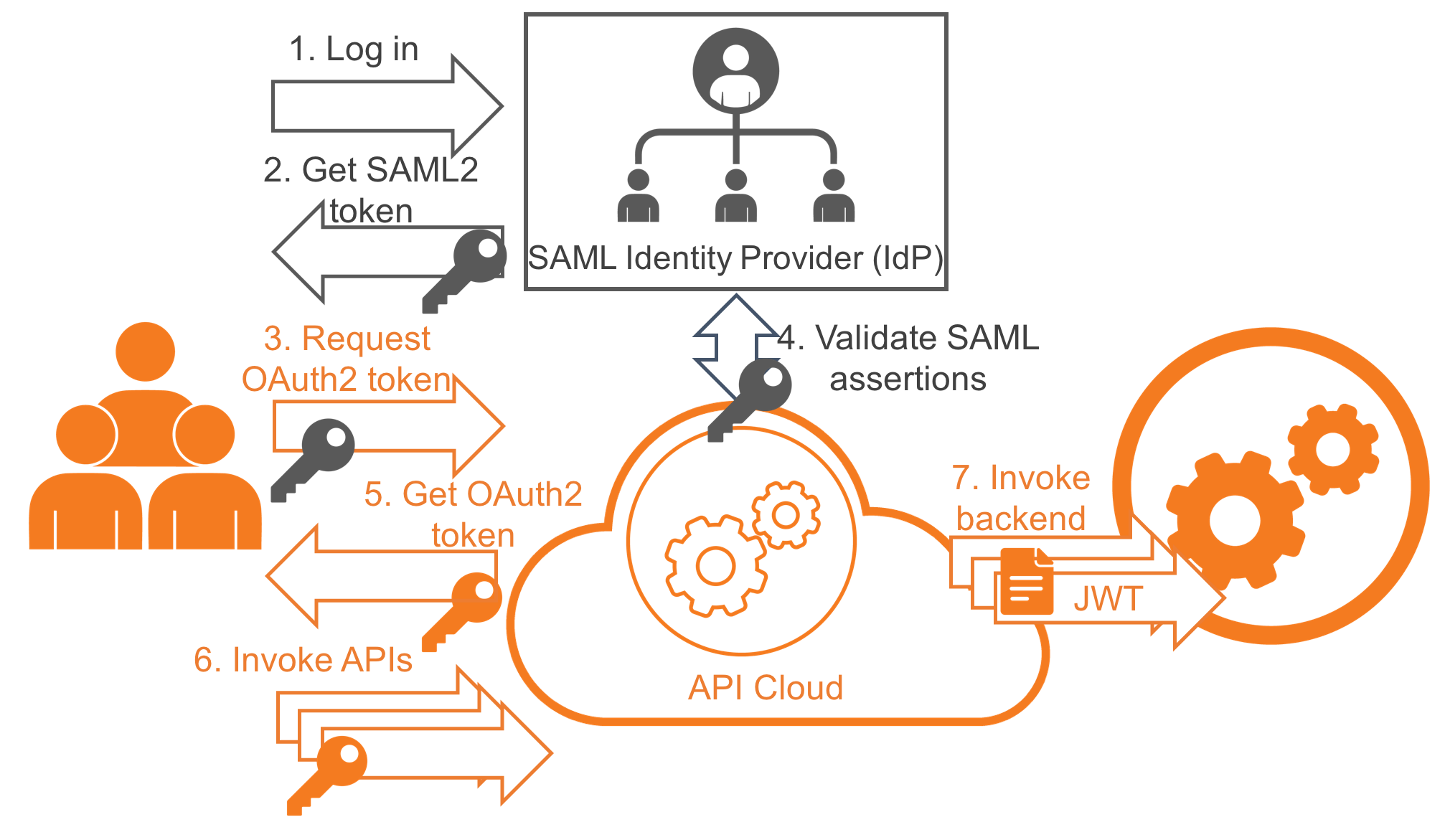
Configuration:
- Configure the cloud to trust the IdP.
- In the Developer Portal (API Store), create your application and get its OAuth consumer secret and consumer key.
Now, let's look at the way the actual authentication and API usage happens in the diagram above:
- Your web or mobile app asks the end-user to log in as it normally would.
- Your corporate Identity Provider (IdP) checks credentials and issues the SAML2 token.
- Now the application needs to generate the personalized OAuth2 token for that end-user and that app. For that, it invokes the API gateway's Token API and passes consumer secret, consumer key, and the SAML2 token.
- API gateway validates the SAML assertions with the IdP. If particular API Scopes are requested, the gateway also checks to see if the roles with which the scopes are associated match the roles in the SAML assertions.
- If validation is successful, API gateway returns the OAuth token and refresh token. The refresh token can be used to renew the OAuth token when it expires.
- Now the application has the OAuth token it needs and can use it to invoke the actual APIs.
- API gateway uses the OAuth token to identify the end-user, apply security and throttling policies, collect analytics data, and pass the calls to the backend. When the backend is invoked, end-user and application information is passed as JWT token.
That is it. See our documentation page for the specific configuration steps and token API calls, and use API Cloud's Support menu if you need any help.