WSO2 is now Choreo LabsLearn more

Trusted AI Governance
Build

Create agents and AI apps with the tools and languages your teams already use.

Connect

Link agents securely to your APIs, data, models and business systems.

Run

Deploy, observe and operate agents and AI apps reliably at any scale.

Govern

Control identity, access, cost and policy for every agent in production.

Agent Management

Developer Platform

  • API Management Cloud

    Design, secure and publish APIs with governance and analytics built in.

    Sign Up Now
  • Integration Cloud

    Connect apps, data and AI agents with low-code and pro-code integration.

    Sign Up Now
  • Identity & Access Management Cloud

    Secure sign-in and access for customers, partners, workforce and agents.

    Sign Up Now
  • Agent Management Cloud

    Build, run and govern AI agents with full visibility and control.

    Sign Up Now
  • Developer Platform Cloud

    Ship cloud-native apps faster on an internal developer platform.

    Sign Up Now

Self-Hosted

Full control over your stack. Deploy directly to your own servers, bare metal, cloud, or Kubernetes environment. Your data never leaves your perimeter.

Product Downloads
Choreo Labs
AI Governance
Platform
Solutions
Resources
Blog

New and improved live log viewer

Debugging APIs can be a challenge when things go wrong. A lot can go unexpectedly while the calls travel from a user application to the API gateway, through transformation engine, to the backend service, and back.  Luckily, WSO2 API Cloud comes with a live Log Viewer screen and we have just released its improved version.

Whenever you want to see what's going on under the hood of API Gateway:

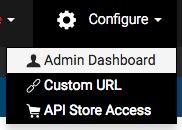
1. In API Cloud, on the Configure menu, click Admin Dashboard:
2. In the API Cloud Admin Dashboard, navigate to Log Analyzer / Live Log Viewer.

3. Invoke the API that you want to troubleshoot (for example, in the Developer Portal or curl or from your application.)

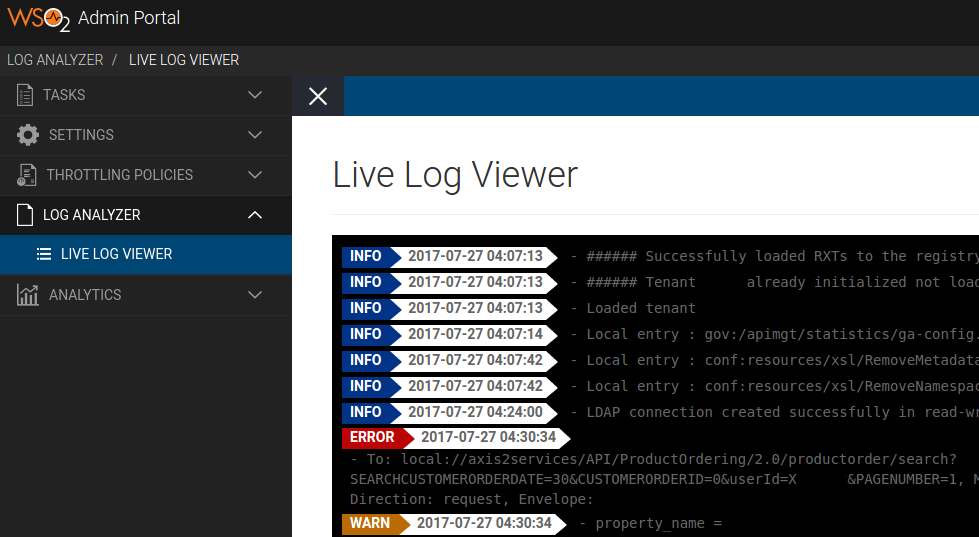
4. See the log in the Log Viewer:

The new Log Viewer:

  • Has a clear visual separation of information, warning, and error messages,
  • Works across all regional gateways around the globe.

Note:

  • API call tracing is off by default, so you will likely not be able to get the detailed information on the actual API and response URLs, headers, and body. To get those, enable tracing before making the calls. Then turn tracing off when you are done troubleshooting.