

Throttle APIs by IP address, headers, parameters, and JWT claims

We have rolled out Advanced Throttling policies and you can now easily add rate- and bandwidth-limiting based on various parameters including IP address, HTTP headers, query parameters, and JWT claims. For example, suppose I have an API for phone number verification created as described in our tutorial. The API accepts 2 parameters: PhoneNumber and LicenseKey. LicenseKey 0 is a demo key so I would like to limit its use: if subscriber supplies 0 as LicenseKey I want to only allow 1 call per minute. For any other key, I will allow 1000 calls. Here's how I can set this up in API Cloud:
We will first start by defining the new throttling policy:
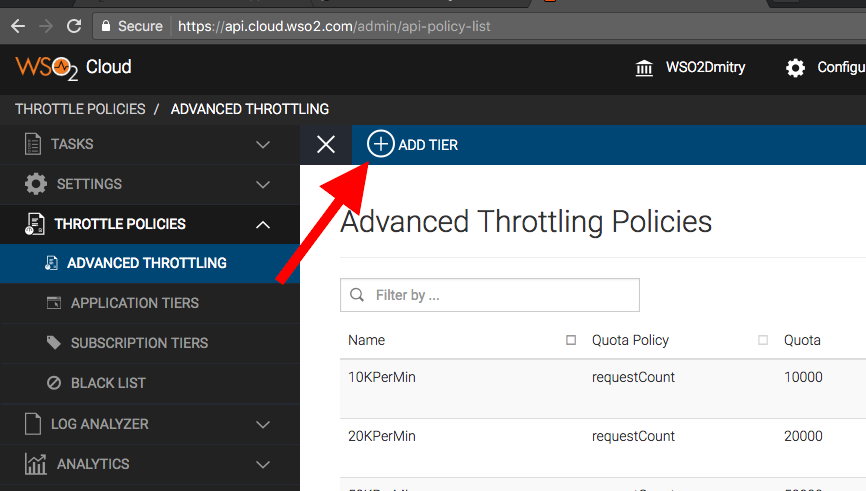
1. In API Cloud, click the Configure / Admin Dashboard menu,
2. In the Admin Dashboard's left-hand menu pane, click Throttling Policies / Advanced Throttling,
3. Click the Add Tier button at the top:
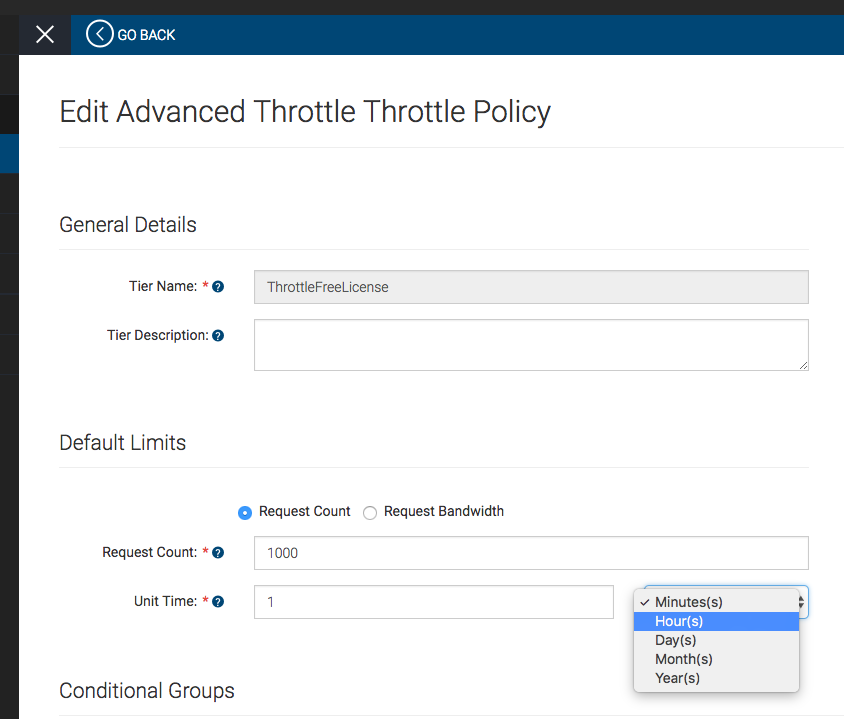
4. Give the new policy a name (I called it 'ThrottleFreeLicense') and set the default limits (I set it to 1000 calls per 1 minute):
5. Now scroll down to the Conditional Groups section and edit the condition.
Policies can have multiple conditional groups but, in our case, we just need one because we only want to set LicenseKey = 0 as the special case.
You can optionally give it a name (such as 'LicenseKey 0 gets 1 req/min') and then select which kind of condition you want to include: IP address, HTTP header, query parameter, or JWT claim.
We will pick Query Param Condition, turn it ON, and then set Param Name to LicenseKey and Param Value to 0.
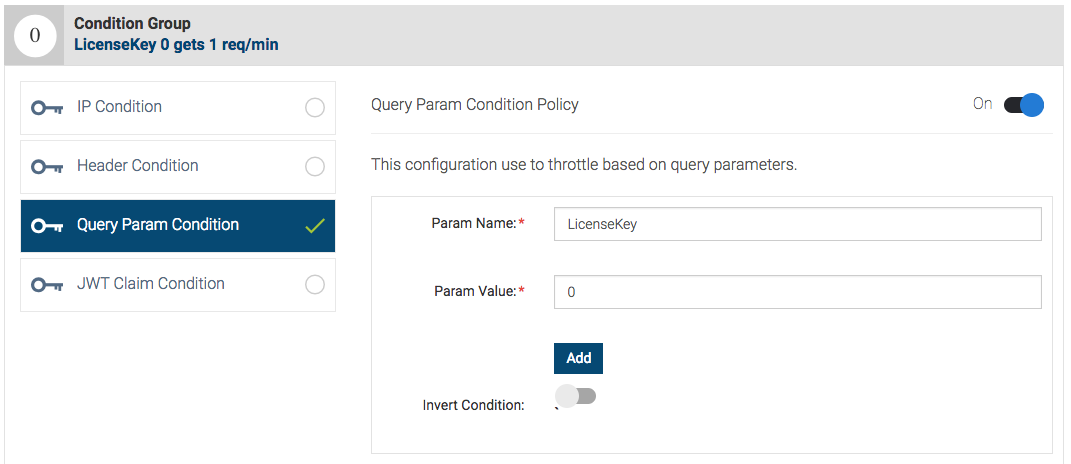
Click the Add button to get the condition added.
6. Now scroll further down and specify the limits when the condition above is met. In my case, when LicenseKey = 0, I want to only one request per minute allowed:
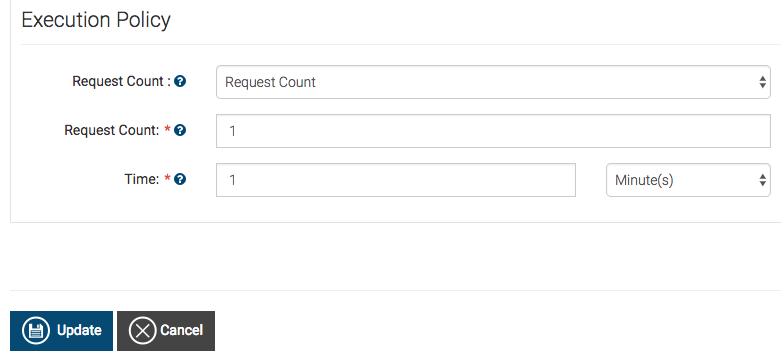
7. Finally, click the Save button to update the policy.
Now we need to assign this new policy to our API:
8. Back in API Cloud's Publisher, open your API for editing,
9. Go to the third step of API editing (3. Manage).
10. In Advanced Throttling Policies, select Apply to API and select your policy (in my case ThrottleFreeLicense) from the drop-down list:
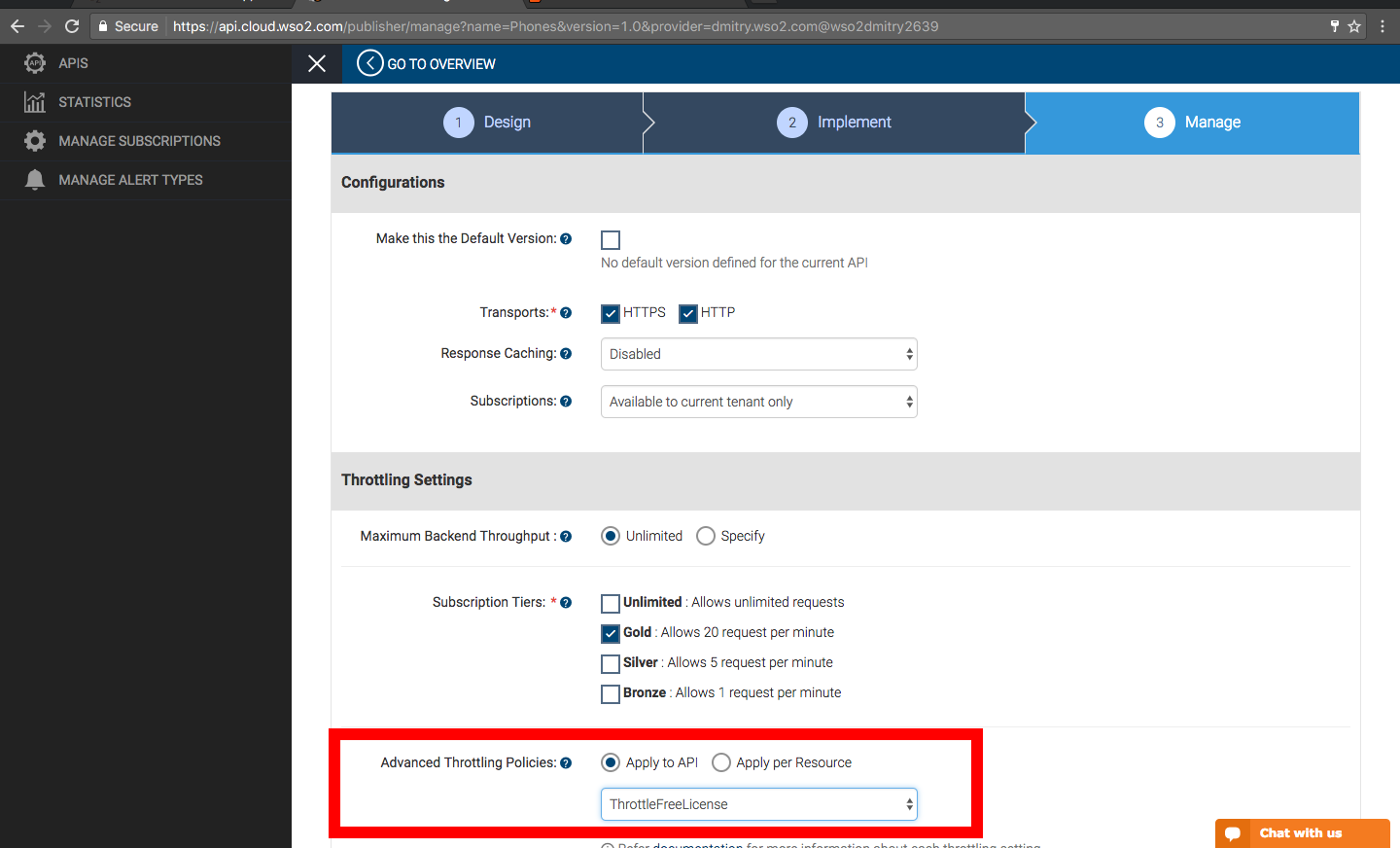
11. Click the Save & Publish button to make the change take effect.
Note: new policies take effect immediately. If you are modifying an existing policy, your changes will likely take about 15 minutes to take effect due to API caching.
Now you can give it a try.
12. Go to API Store and invoke the API either from the API Console tab or a curl command or any other client. You will see that the first invocation with LicenseKey = 0 succeeds while the immediate next one fails:
$ curl -X GET --header 'Accept: text/xml' --header 'Authorization: Bearer ca115527-25a7-3bba-879a-xxxxxxxxxxxx' 'https://gateway.api.cloud.wso2.com:443/t/wso2dmitry2639/phones/1.0/CheckPhoneNumber?PhoneNumber=8888888888&LicenseKey=0'
<?xml version="1.0" encoding="utf-8"?>
<PhoneReturn xmlns:xsd="https://www.w3.org/2001/XMLSchema" xmlns:xsi="https://www.w3.org/2001/XMLSchema-instance" xmlns="https://ws.cdyne.com/PhoneVerify/query">
<Company>Toll Free</Company>
<Valid>true</Valid>
<Use>Assigned to a code holder for normal use.</Use>
<State>TF</State>
</PhoneReturn>$
$ curl -X GET --header 'Accept: text/xml' --header 'Authorization: Bearer ca115527-25a7-3bba-879a-xxxxxxxxxxxx' 'https://gateway.api.cloud.wso2.com:443/t/wso2dmitry2639/phones/1.0/CheckPhoneNumber?PhoneNumber=8888888888&LicenseKey=0'
<amt:fault xmlns:amt="https://wso2.org/apimanager/throttling"><amt:code>900800</amt:code><amt:message>Message throttled out</amt:message><amt:description>You have exceeded your quota</amt:description><amt:nextAccessTime>2017-Jan-05 17:14:00+0000 UTC</amt:nextAccessTime></amt:fault>$
Besides exact match conditions (like in my example above) you can also specify IP address ranges and regular expressions for HTTP headers and JWT token claims.
Advanced throttling is a powerful mechanism that allows you to fine-tune rate limits and bandwidth based on various API call conditions.
Give it a try in API Cloud today!