


Photo by Ivan Aleksic on Unsplash
Choreo is an internal developer platform where you can develop, deploy, and manage your cloud native applications with minimal effort. Authentication and authorization are essential to consider when restricting access to your application. Determining the legitimacy of the consumer of your cloud application is the main purpose of authentication. Authorization guarantees that the consumer has the necessary permissions to access your applications.
Authentication and Authorization
To enable authentication and authorization, you must first configure an Identity Provider (IDP) as a central service for storing and managing user identities, applications, and other identity-related data. Once you have set up your IDP, authorized users can obtain access tokens from it through various grant types such as authorization code, client credentials, implicit and refresh token.
If your application runs on Choreo, it should only allow intended users to access your application. Choreo performs authentication and authorization based on the access token it receives in the HTTP request for your application. Choreo first checks if the access token received is legitimate by validating its signature against the IDP’s JSON Web Key (JWK) set. If the signature validation is successful, it checks the token claims and decides whether it has the necessary permissions to access your service. If everything is in order, the consumer can invoke your service successfully. This is seen in Figure 1.
Currently, Choreo uses Asgardeo as its default Identity Provider.
What’s New
Register an External IDP to Authenticate your Application Consumers
You may have a situation where your organization has already decided to use a particular IDP. Your IDP may have already been provisioned with the required users. In that case, you can directly register your IDP in your organization by providing an IDP name and the well-known URL of your IDP (which contains the open-id configuration). Since your consumers can acquire access tokens from your IDP, they can use them to access applications deployed in Choreo. Choreo only supports Azure Active Directory and Asgardeo IDPs at the time of writing, but plans are in place to support others as well.
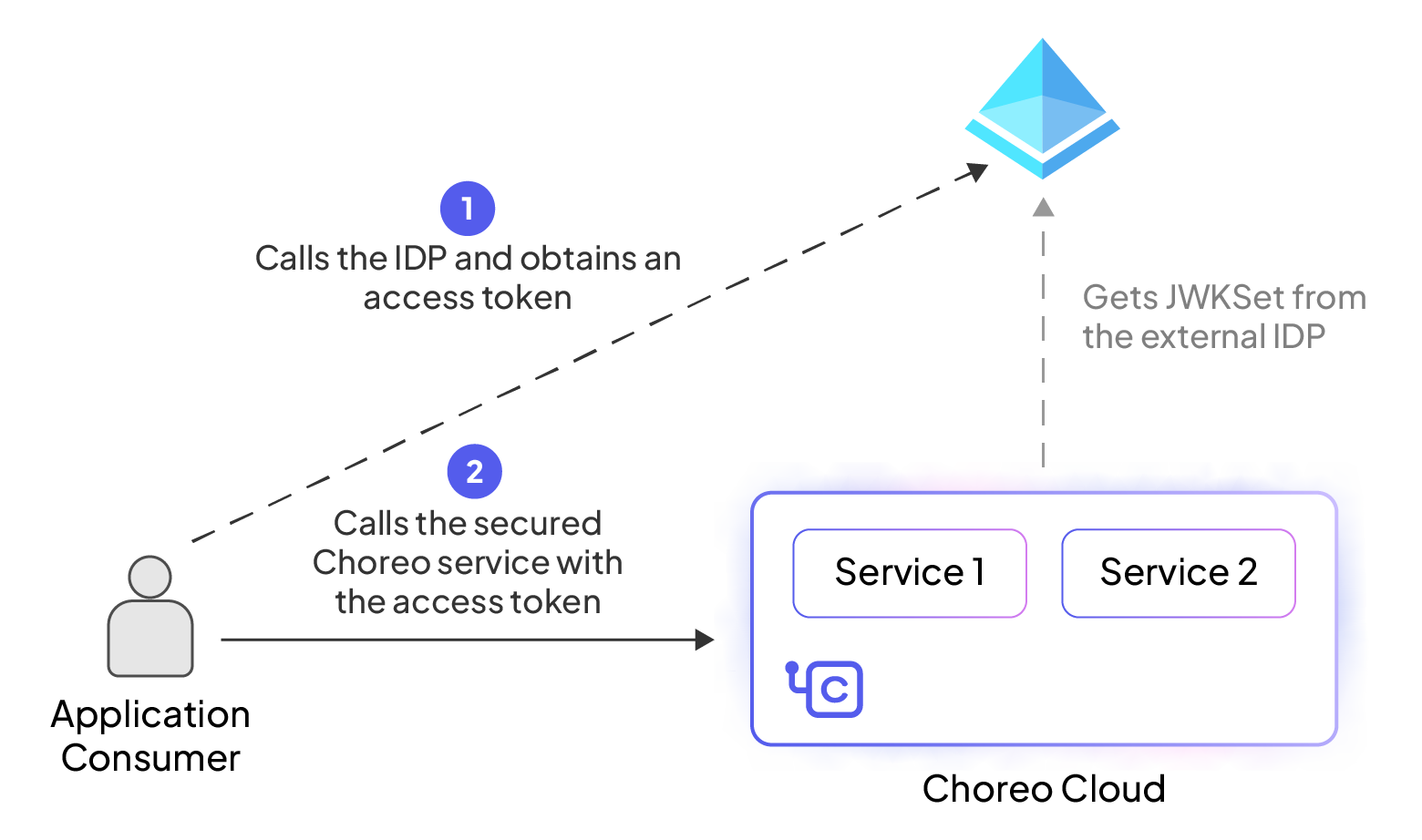
Figure 1: Invoking a service in Choreo in Choreo using a Microsoft Entra ID (Azure AD) token
Environment-specific IDPs
External IDPs can also be associated with specific environments. This may involve developers performing application testing and real production customers. Imagine a scenario where you employ two distinct IDP tenants to manage these two user types, and you must ensure that developers cannot access the production environment. In such a case, you can register the two IDP tenants and restrict their usage to specific environments.
To learn more about this feature, please refer to the following documentation.
- How to configure Asgardeo as an an External IDP
- How to configure Microsoft Entra ID (Azure AD) as an External IDP
- How to secure API access with Asgardeo
- How to secure API access with Microsoft Entra ID (Azure AD)
By incorporating External Identity Provider Support, Choreo strengthens your security and enhances your flexibility. Visit Choreo today to explore this feature, adapt it to your unique needs, and join us in shaping a more secure and adaptable future for your cloud native applications.