

Simplifying configuration with WSO2 Identity Server

Introduction
Configuring a product is an essential task in any deployment. Product configuration should be user-friendly since this is the point where the first user interaction takes place within the product.
WSO2 products are built using a collection of components and many of those components have their own configuration files. Previously, users had to configure these component configuration files. For example, axis2.xml, carbon.xml, and data sources.xml are component-specific configuration files. The experience is interrupted since time is spent configuring a set of components.
The ideal user experience should be that the user is configuring the product without knowing anything about the components. This level of abstraction for configuration is achieved from Identity Server 5.9 with a single configuration file for the whole product.
What are we solving?
There were several drawbacks in the previous configuration model, which had different configuration files for different components.
The major problem was that the user experience was broken since a user had to configure the component level rather than the product. It is hard for users to understand why they need these configurations since they are not aware of the component level.
Another problem with having multiple configuration files is that users have to change configurations in different places to achieve a single requirement. This causes a lot of human errors and interrupts a potentially seamless experience.
Apart from these two major drawbacks, there were other shortcomings in the previous model as shown below.
- No proper structure for the config files.
- Parameter naming is inconsistent.
- The time unit is not consistent across the configuration files, and, sometimes, the time unit is not mentioned.
- Users can see all the configurations in the components, which are not mandatory or essential.
How are we solving this?
The ideal user experience is when the user doesn’t need to pay attention to components and only focus on the configuration. So, ideally, each product should have only a single file the user needs to know about.
Having a single file to configure increases user-friendliness and can minimize human errors that could happen during the configuration. But, if we include all the configurations from the old model and pack them in a single file, that will not solve any of the above-mentioned issues.
We have introduced a new config model that contains a single configuration file with the level of abstraction. Users will only see the mandatory and essential configurations that are in the product. Some configurations will be inferred through mandatory configurations without user intervention.
All the configurations are grouped in a proper structure and the parameter naming is consistent throughout the product. Users have the ability to use a proper time unit for a configuration.
Let's compare!
From version 5.9.0 onwards, WSO2 Identity Server will have a single configuration file —“deployment.toml” which will be responsible for all the configurations related to the product.
Let's compare both models: the configuration model with multiple files vs. the configuration model with a single file.
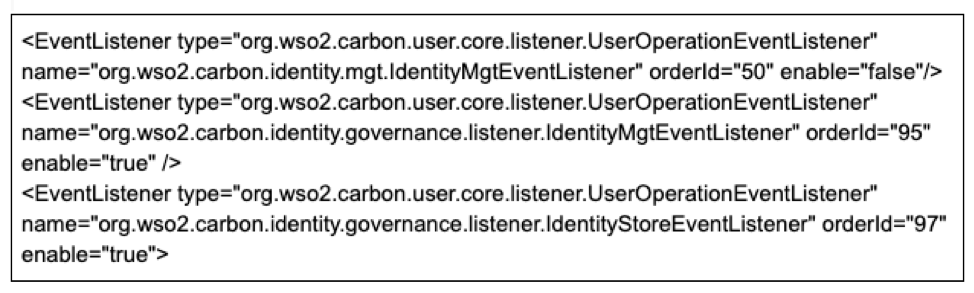
If a user needs to enable password recovery using email-based notifications using the configuration model with multiple files, he or she should follow the steps listed below.
Step 1: Ensure that the "IdentityMgtEventListener" with the orderId=50 is set to false and that the Identity Listeners with orderId=95 and orderId=97 are set to true in the
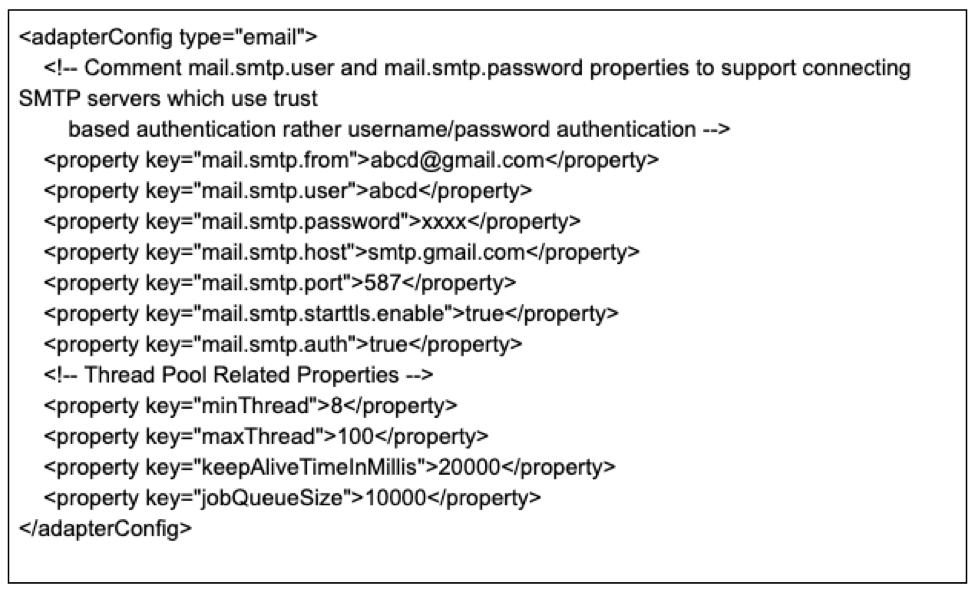
Step 2: Configure the following email settings in the
If a user needs to enable password recovery using email-based notifications using the configuration model with the single configuration, he or she should follow the steps below.
Step1: Add the following configuration sections to
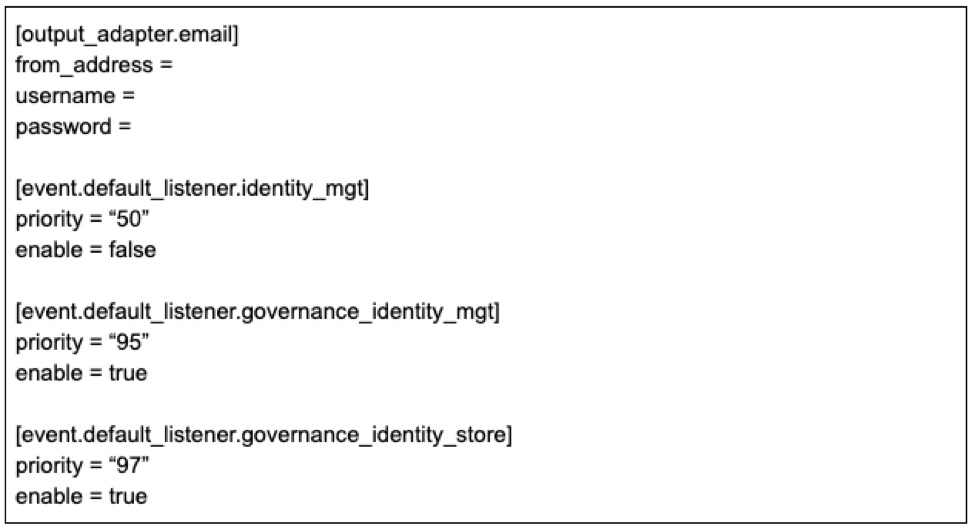
The above comparison makes it clear that having a single configuration file makes life easy for a user and minimizes human error.
The latest version of WSO2 Identity Server also provides support for REST APIs and FIDO2 support for passwordless authentication, enabling a better developer experience. You can find the latest features of WSO2 Identity Server here. Haven’t tried it yet? Download and try it now.