

Introducing semantic version-based intelligent routing

Photo by Matias Contreras on Unsplash
One of the main challenges API producers face is making improvements and enhancements to their APIs without getting their clients to upgrade API versions (i.e., change their applications). We're excited to introduce semantic version-based intelligent routing in Choreo, making API consumption easier than ever. This feature groups APIs into their major versions, and the corresponding URLs are simplified to include only the major version number. As a result, API consumers always get the latest version of an API, without having to track or specify the exact minor/patch version.
What is a Major Version Range?
This refers to a group of versions with the same major version number. For example, the API named Cats, with versions v1.0, v1.1, and v1.2, belongs to the major version range "v1". When the Cats API publishes v2.0, it will be part of the "v2" major version range.
The intelligent routing feature is built assuming that API producers only make backward-compatible changes within one major version range. Backward incompatible changes should only be done in a new major version. This way, API consumers are guaranteed to get backward-compatible updates and fixes.
How Do I Consume the Latest API on a Major Version Range?
The APIs you consume may get new versions with feature improvements, bug fixes, etc. As an API consumer, you don’t need to update your client configs to include minor version details. With Choreo’s intelligent routing feature, your apps can easily access the latest API version by specifying its major version number. This is illustrated in Figure 1.
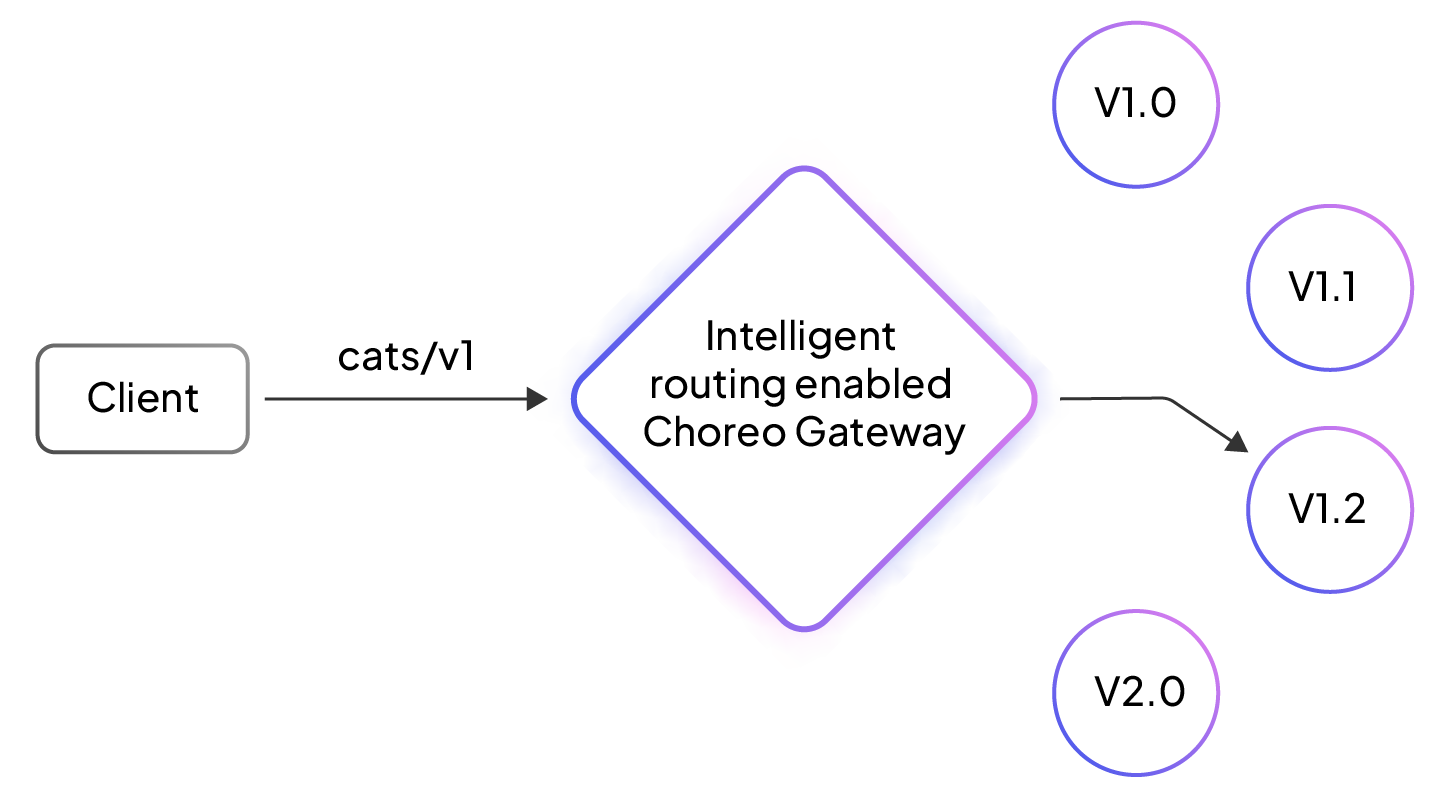
Figure 1: Intelligent routing with Choreo Gateway
What's New?
- Existing APIs and subscriptions will continue to work as usual.
- Choreo APIs will get the intelligent routing feature by default and be discoverable in their major versions.
- API consumers can easily find and subscribe to each API’s latest major version, which is prominently displayed.
- API publishers can retire old versions without disrupting consumers, as older API versions that are not subscribed to will be hidden from view.
- New subscriptions will be valid for all versions of the subscribed API's major version range. API consumers don't need to create new subscriptions or update their configurations when a new version is released.
- The latest API versions' endpoint URLs will include the major version. This ensures API clients don't need to change when a new version is released.
- Exact version-based API invocation will still be supported, in addition to intelligent routing.
Getting Started
To begin with semantic version-based intelligent routing, follow these steps:
- Create a new service.
- Expand the “Deployment Track” dropdown and click the “Create New” button on the service overview page.
- Select a branch, input the API version “v1.1”, and click on “Create.”
- Deploy the service and publish it.
- Similarly, create another deployment track with API version v1.2, deploy it, and publish it.
- Go to the Choreo developer portal and find the API you published. Please note that the API is listed by its major version range (v1).
- Navigate to the “Try Out” page and try out the API. Please note that the try-out URL includes v1 and will return the service response included in the deployment track v1.2.
This feature aims to make your API consumption seamless and efficient. We encourage you to explore this capability and share your feedback with us.