Custom Gateway Executor
This feature is deprecated and is only intended for migrating customers. Please transition to the OpenAPI based extensions for all new implementations.
Writing a custom Gateway Executor
The WSO2 Open Banking Accelerator contains extension points known as Open Banking Executors that can validate and manipulate API requests. The executors can mediate and enforce different policies based on regulatory and other requirements. You can use the executors to perform the following:
- Intercept requests and responses before and after API authentication
- Modify request/response headers and payloads
- Configure custom error messages
- Add custom attributes. For example, data reporting
For the executors, you can configure context attributes (for example, consent ID) provided by swagger definitions. These context attributes are shared through a particular request/response flow. You can also define the order of execution by the flow.
To build your own executor, implement the following interface:
com.wso2.openbanking.accelerator.gateway.executor.core.OpenBankingGatewayExecutor
The com.wso2.openbanking.accelerator.gateway-3.0.0.jar JAR file inside the
<APIM_HOME>/repository/components/dropins directory contains all the Java implementations related to gateway
executors.
Use the following data model and implement the interface methods according to your requirements:
Data model
Click here to see the data model associated with the OpenBankingGatewayExecutor interface.
For OBAPIRequestContext:
| DTO | DTO | Parameter | Data Type | Description |
|---|---|---|---|---|
| RequestContextDTO | MsgInfoDTO | headers | Map | The request headers contained in the HTTP Request |
| RequestContextDTO | MsgInfoDTO | payloadHandler | PayloadHandler | The object created to consume the request payload. Instead of this, you can directly use the requestPayload string object in OBAPIRequestContext and read the payload of the request |
| RequestContextDTO | MsgInfoDTO | resource | String | An API resource |
| RequestContextDTO | MsgInfoDTO | electedResource | String | An elected resource |
| RequestContextDTO | MsgInfoDTO | httpMethod | String | The HTTP method of the request |
| RequestContextDTO | MsgInfoDTO | messageId | String | A unique ID given to a particular request |
| RequestContextDTO | APIRequestInfoDTO | context | String | The API context given when publishing the API |
| RequestContextDTO | APIRequestInfoDTO | version | String | The published version of the API |
| RequestContextDTO | APIRequestInfoDTO | username | String | The owner of the access token |
| RequestContextDTO | APIRequestInfoDTO | consumerKey | String | The client ID/Consumer Key of the API consumer application |
| RequestContextDTO | APIRequestInfoDTO | apiId | String | A unique ID given for the API |
| RequestContextDTO | X509Certificate | X509Certificate | The Transport certificates sent with the request (if available) | |
| contextProps | Map | A map of context properties. You can access and modify these in any executor | ||
| modifiedPayload | String | The modified payload as a string | ||
| requestPayload | String | The request payload as a string | ||
| addedHeaders | Map | The headers that need to be added backend request | ||
| isError | Boolean | A boolean value to indicate the error state | ||
| errors | List<Error> | A list of errors found in the request (if available) | ||
| consentId | String | The consent ID of the request (if available) | ||
| analyticsData | Map | A map of analytics data that needs to be published to Open Banking Business Intelligence | ||
| OpenAPI | OpenAPI | The Open API object of the published API Swagger |
For OBAPIResponseContext:
| DTO | DTO | Parameter | Data Type | Description |
|---|---|---|---|---|
| ResponseContextDTO | MsgInfoDTO | headers | Map | The request headers in the HTTP response |
| ResponseContextDTO | MsgInfoDTO | payloadHandler | PayloadHandler | The object created to consume the request payload as an interface. Instead of this, you can directly use the requestPayload string object in OBAPIRequestContext and read the payload of the request |
| ResponseContextDTO | MsgInfoDTO | resource | String | An API resource |
| ResponseContextDTO | MsgInfoDTO | electedResource | String | An elected resource |
| ResponseContextDTO | MsgInfoDTO | httpMethod | String | The HTTP method of the request |
| ResponseContextDTO | MsgInfoDTO | messageId | String | A unique ID given to a particular request |
| ResponseContextDTO | APIRequestInfoDTO | context | String | The API context given when publishing the API |
| ResponseContextDTO | APIRequestInfoDTO | version | String | The published version of the API |
| ResponseContextDTO | APIRequestInfoDTO | username | String | The owner of the access token |
| ResponseContextDTO | APIRequestInfoDTO | consumerKey | String | The client ID/Consumer Key of the API consumer application |
| ResponseContextDTO | APIRequestInfoDTO | apiId | String | A unique ID given for the API |
| ResponseContextDTO | Status Code | String | The HTTP response status code | |
| contextProps | Map | A map of context properties. You can access and modify these in any executor | ||
| modifiedPayload | String | The modified payload as a string | ||
| responsePayload | String | The response payload as a string | ||
| addedHeaders | Map | The headers that need to be added to the response (if available) | ||
| isError | Boolean | A boolean value to indicate the error state | ||
| errors | List<Error> | A list of errors found in the response | ||
| analyticsData | Map | A map of analytics data that needs to be published to Open Banking Business Intelligence |
preProcessRequest method
This method handles the requests before API Authentication.
public void preProcessRequest(OBAPIRequestContext obapiRequestContext);
postProcessRequest method
This method handles the requests after API Authentication.
public void postProcessRequest(OBAPIRequestContext obapiRequestContext);
preProcessResponse method
This method handles the responses before API Authentication.
public void preProcessResponse(OBAPIResponseContext obapiResponseContext);
postProcessResponse method
This method handles the responses after API Authentication.
public void postProcessResponse(OBAPIResponseContext obapiResponseContext);
Use the above methods and the context attributes to implement the necessary logics. However, you can ignore implementing any method and not return anything. Once implemented, build a JAR file for the project.
Configuring a custom executor
-
Place the above-created JAR file in the
<APIM_HOME>/repository/components/libdirectory.noteIf it’s an OSGI JAR file, place it in the
<APIM_HOME>/repository/components/dropinsdirectory. -
Open the
<APIM_HOME>/repository/conf/deployment.tomlfile.- Find the
open_banking.gateway.openbanking_gateway_executors.typetags and add/modify them according to the type of your consent. For example,Payments. - Add the Fully Qualified Name (FQN) of the executor under the
open_banking.gateway.openbanking_gateway_executors.type.executorstag as shown below:
[[open_banking.gateway.openbanking_gateway_executors.type]]name = "Payments"[[open_banking.gateway.openbanking_gateway_executors.type.executors]]name = "com.wso2.openbanking.accelerator.gateway.executor.impl.api.resource.access.validation.APIResourceAccessValidationExecutor"priority = 1[[open_banking.gateway.openbanking_gateway_executors.type.executors]]name = "com.wso2.openbanking.accelerator.gateway.executor.impl.consent.ConsentEnforcementExecutor"priority = 2[[open_banking.gateway.openbanking_gateway_executors.type.executors]]name = "com.wso2.openbanking.accelerator.gateway.executor.impl.error.handler.OBDefaultErrorHandler"priority = 1000Click here to see the order of execution...
- If only one set of executors are configured for an API flow, the order of execution is as follows:

- If there is more than one set of executors for an API flow, given below is the order they get executed:
For example, if there are 3 sets:
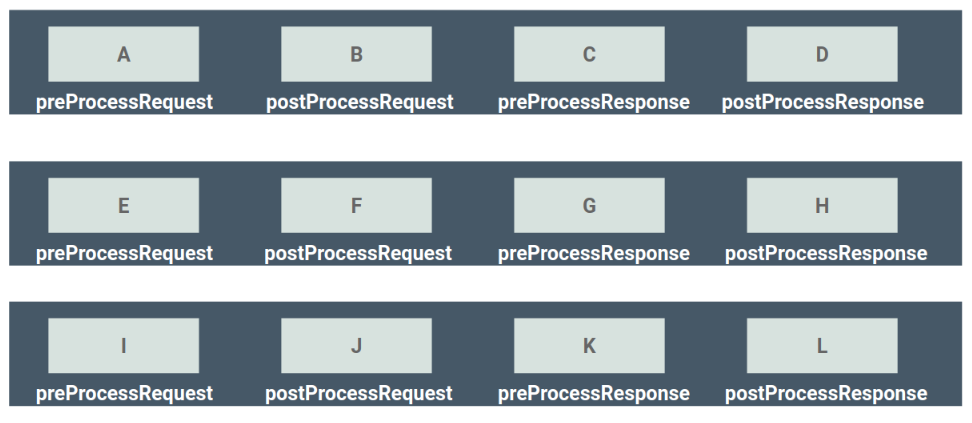
- The order is: A -> E -> I -> B-> F -> J -> C -> G -> K -> D -> H -> L
note-
The default Request Router only reads the
Defaulttag in<APIM_HOME>/repository/conf/deployment.toml. -
If you haven’t already configured a custom Request Router make sure to configure it.
- Open the
<APIM_HOME>/repository/conf/deployment.tomlfile. - Follow the given sample configurations and configure your router.
[[open_banking.gateway.openbanking_gateway_executors.type]]name = "Accounts"[[open_banking.gateway.openbanking_gateway_executors.type.executors]]name = "com.wso2.openbanking.accelerator.gateway.executor.impl.api.resource.access.validation.APIResourceAccessValidationExecutor"priority = 1[[open_banking.gateway.openbanking_gateway_executors.type.executors]]name = "com.wso2.openbanking.accelerator.gateway.executor.dcr.DCRExecutor"priority = 2[[open_banking.gateway.openbanking_gateway_executors.type.executors]]name = "com.wso2.openbanking.accelerator.gateway.executor.impl.error.handler.OBDefaultErrorHandler"priority = 1000
- Open the
-
For more information, see Configuring a custom Request Router
- Find the
-
Save the above configurations and restart the API Manager server.
-
Publish and invoke an API of your choice to ensure that the customer executor is running.
tipEnable logs for that particular executor class to inspect if the executor is running successfully.
Was this page helpful?