Try Out a Basic Consent Flow
This document provides step-by-step instructions to try out the basic consent flow, including consent initiation, authorization, retrieval, and deletion.
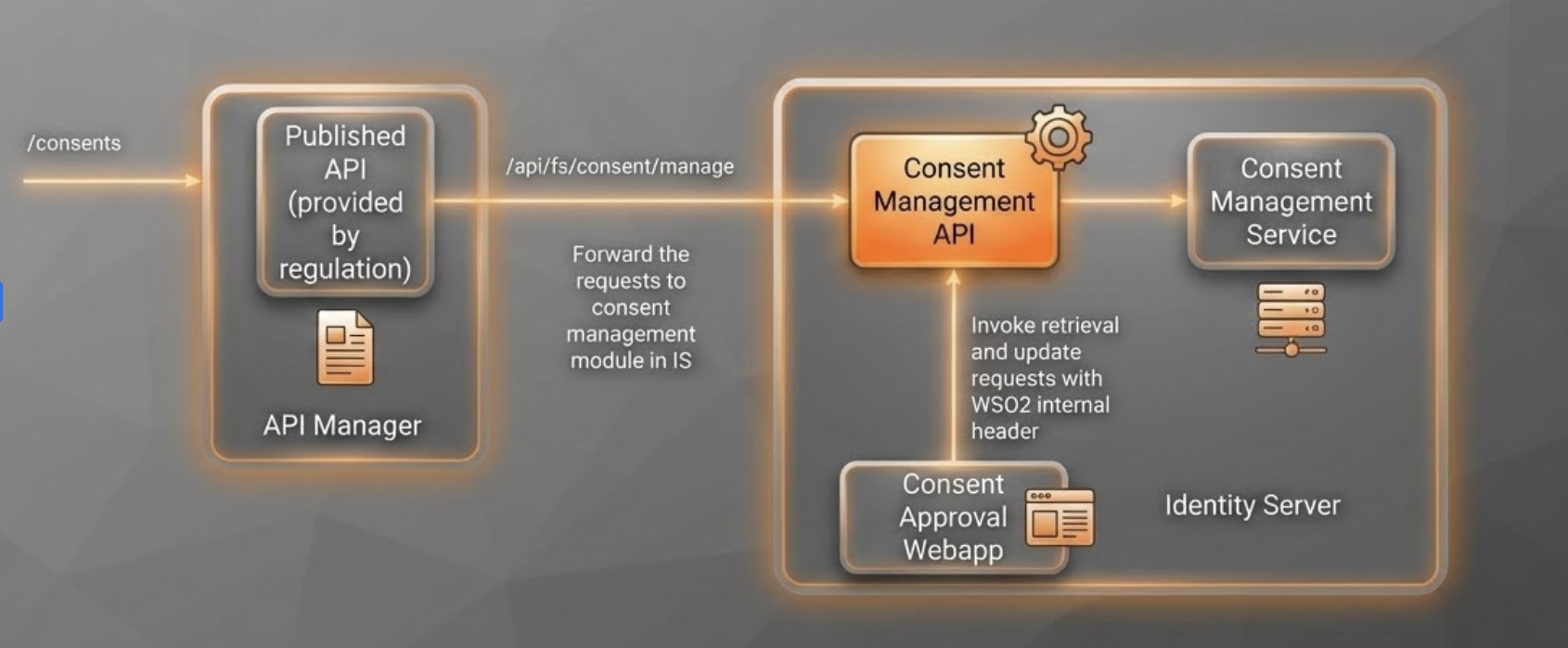
Prerequisites
Before you try out the consent flow, ensure you have completed the following:
- Configure API Resources, Users, and Roles
- Assign roles to the user
- Register an application for the API consumer
- Replace
<AUTH_HEADER_VALUE>with Base64 encodedadmin_username:admin_passwordvalue
Example:Base64(admin_username:admin_password) - Transport certificates are available here
Step 1: Consent Initiation
Create a request to obtain the customer's consent to access their bank accounts and related information.
Sample Request:
curl -X POST \
  'https://<IS_HOSTNAME>:9446/api/fs/consent/manage/account-access-consents' \
-H 'Authorization: Basic <AUTH_HEADER_VALUE>' \
-H 'x-wso2-client-id: <CLIENT_ID>' \
-H 'x-fapi-interaction-id: <INTERACTION_ID>' \
-H 'Content-Type: application/json' \
--cert <TRANSPORT_PUBLIC_KEY_FILE_PATH> --key <TRANSPORT_PRIVATE_KEY_FILE_PATH> \
--data '{
  "Data": {
      "TransactionToDateTime": "2026-03-19T13:46:07.270659+05:30",
      "ExpirationDateTime": "2026-03-21T13:46:07.269894+05:30",
      "Permissions": [
          "ReadAccountsBasic",
          "ReadAccountsDetail",
          "ReadBalances",
          "ReadTransactionsDetail"
      ],
      "TransactionFromDateTime": "2026-03-16T13:46:07.270580+05:30"
  },
  "Risk": {

  }
}'
Sample Response:
The response contains a Consent ID:
{
  "Data": {
      "StatusUpdateDateTime": "2026-03-16T13:46:08+05:30",
      "Status": "AwaitingAuthorisation",
      "CreationDateTime": "2026-03-16T13:46:08+05:30",
      "TransactionToDateTime": "2026-03-19T13:46:07.270659+05:30",
      "ExpirationDateTime": "2026-03-21T13:46:07.269894+05:30",
      "Permissions": [
          "ReadAccountsBasic",
          "ReadAccountsDetail",
          "ReadBalances",
          "ReadTransactionsDetail"
      ],
      "ConsentId": "328524c0-b4a3-457e-a145-e79d92c4654e",
      "TransactionFromDateTime": "2026-03-16T13:46:07.270580+05:30"
  },
  "Risk": {

  }
}
Step 2: Authorize a Consent
The bank sends the request to the customer stating the accounts and information that the API consumer wishes to access.
2.1 Generate Request Object
Generate the request object by signing the following JSON payload using supported algorithms:
- Sample
- Format
eyJraWQiOiJfTG03VFVWNF8yS3dydWhJQzZUWTdtel82WTQxMlhabG54dHl5QXB6eEw4IiwiYWxnIjoiUFMyNTYiLCJ0eXAiOiJKV1QifQ.eyJtYXhfYWdlIjo4NjQwMCwiYXVkIjoiaHR0cHM6Ly9sb2NhbGhvc3Q6OTQ0Ni9vYXV0aDIvdG9rZW4iLCJzY29wZSI6ImFjY291bnRzIG9wZW5pZCIsImlzcyI6IjRoWklMQVRmUHlYbExGcWtQM1owT0JZaG1Ed2EiLCJjbGFpbXMiOnsiaWRfdG9rZW4iOnsiYWNyIjp7InZhbHVlcyI6WyJ1cm46b3BlbmJhbmtpbmc6cHNkMjpzY2EiLCJ1cm46b3BlbmJhbmtpbmc6cHNkMjpjYSJdLCJlc3NlbnRpYWwiOnRydWV9LCJvcGVuYmFua2luZ19pbnRlbnRfaWQiOnsidmFsdWUiOiI4NmM4YTA4NS1hNDQ0LTQyZDUtYmU0My05NjhiMzY2YTU0NjciLCJlc3NlbnRpYWwiOnRydWV9fSwidXNlcmluZm8iOnsib3BlbmJhbmtpbmdfaW50ZW50X2lkIjp7InZhbHVlIjoiODZjOGEwODUtYTQ0NC00MmQ1LWJlNDMtOTY4YjM2NmE1NDY3IiwiZXNzZW50aWFsIjp0cnVlfX19LCJyZXNwb25zZV90eXBlIjoiY29kZSBpZF90b2tlbiIsInJlZGlyZWN0X3VyaSI6Imh0dHBzOi8vd3d3Lmdvb2dsZS5jb20vIiwic3RhdGUiOiJZV2x6Y0Rvek1UUTIiLCJleHAiOjE2MzM1ODY0MDgsIm5vbmNlIjoibi0wUzZfV3pBMk1qIiwiY2xpZW50X2lkIjoiNGhaSUxBVGZQeVhsTEZxa1AzWjBPQllobUR3YSJ9.LytrdYnlos_hq5p21KVf8P0KkixetUseR1RnhMLtvQJOZow2vspm-XGltU5b4ciFdfdvkRvOh4qSjFozrYabMDToUnSDjoxyLTi5e5kBld81SyWeCt2XQwMV1qQdS4N-ISuTHHUsECox73-rF5kRmi_8RFfJSi2fUjtXkGZpo5JhQIJ1v37IQrOi3RlPhhH33kiVataXtWP1Dy5c28xAKXFaMkm7apRT5X6Rf1s34A9iouQuuxdVi6PCrwFutbYZnrNwy8EW7UMI7YNZsrkfhcXgJt0BMMsgNdIhYXdr7Ui3_q-ICi6zMRQuov0yTbVuHEkjsK2u81EIV3e2C_u_Jg
{
  "kid": "<The KID value of the signing jwk set>",
  "alg": "<SUPPORTED_ALGORITHM>",
  "typ": "JWT"
}
{
  "max_age": 86400,
      "aud": "<This is the audience that the ID token is intended for. Example: https://<IS_HOST>:9446/oauth2/token>",
  "scope": "accounts openid",
  "iss": "<CLIENT_ID>",
  "claims": {
    "id_token": {
      "acr": {
        "values": [
          "urn:openbanking:psd2:sca",
          "urn:openbanking:psd2:ca"
        ],
        "essential": true
      },
      "openbanking_intent_id": {
        "value": "<CONSENTID>",
        "essential": true
      }
    },
    "userinfo": {
      "openbanking_intent_id": {
        "value": "<CONSENTID>",
        "essential": true
      }
    }
  },
  "response_type": "code id_token",
  "redirect_uri": "<CLIENT_APPLICATION_REDIRECT_URI>",
  "state": "YWlzcDozMTQ2",
  "exp": <The expiration time of the request object in Epoch format>,
  "nonce": "<PREVENTS_REPLAY_ATTACKS>",
  "client_id": "<CLIENT_ID>"
}
2.2 Send Authorization Request
The bank sends the authorization request to the customer in the following URL format:
- Sample
- Format
https://localhost:9446/oauth2/authorize?response_type=code%20id_token&client_id=LvbSjaOIUPmAWZT8jdzyvjqCqY8a&redirect_uri=https://wso2.com&scope=openid accounts&state=0pN0NBTHcv&nonce=jBXhOmOKCB&request=<REQUEST_OBJECT>
https://<IS_HOST>:9446/oauth2/authorize?response_type=code%20id_token&client_id=<CLIENT_ID>&scope=accounts%20op
enid&redirect_uri=<APPLICATION_REDIRECT_URI>&state=YWlzcDozMTQ2&request=<REQUEST_OBJECT>&prompt=login&nonce=<REQUEST_OBJECT_NONCE>
2.3 Complete Authorization Flow
-
Replace the
<CLIENT_ID>placeholder with the value obtained during application registration. -
Upon successful authentication, the user is redirected to the consent authorization page. Use login credentials of a user with the
subscriberrole. -
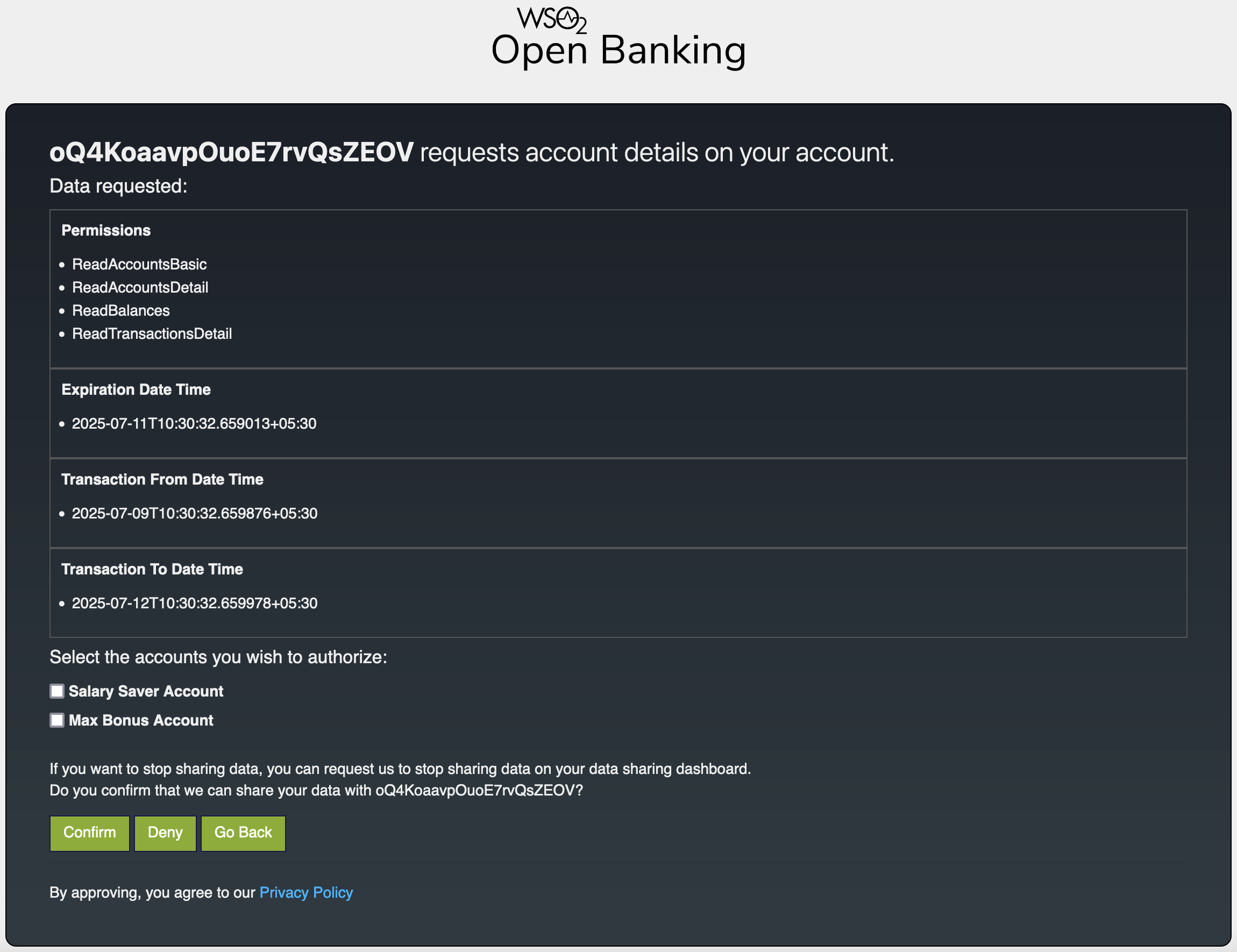
The consent page displays:
- List of bank accounts
- Information that the API consumer wishes to access
-
Review the displayed consent data:
- Permissions
- Transaction period
- Expiration date
-
Click Confirm to grant these permissions.
-
Upon providing consent, an authorization code is generated in the
redirect_uriURL.
Sample Authorization Code Response:
The authorization code is in the code parameter (code=e61579c3-fe9c-3dfe-9af2-0d2f03b95775):
https://wso2.com/#code=e61579c3-fe9c-3dfe-9af2-0d2f03b95775&id_token=eyJ4NXQiOiJNell4TW1Ga09HWXdNV0kwWldObU5EY3hOR1l3WW1
NNFpUQTNNV0kyTkRBelpHUXpOR00wWkdSbE5qSmtPREZrWkRSaU9URmtNV0ZoTXpVMlpHVmxOZyIsImtpZCI6Ik16WXhNbUZrT0dZd01XSTBaV05tTkRjeE5
a4f936c74e2ca7f4250208aa42.sk_04ejciXBj6DnpALyYaw
Step 3: Retrieve a Consent
Use the Consent Retrieval endpoint to retrieve a consent resource and check its status.
Sample Request:
curl -X GET \
  https://<IS_HOSTNAME>:9446/api/fs/consent/manage/account-access-consents/<CONSENT_ID> \
  -H 'Authorization: Basic <AUTH_HEADER_VALUE>' \
  -H 'x-wso2-client-id: <CLIENT_ID>' \
  -H 'x-fapi-interaction-id: <INTERACTION_ID>' \
  -H 'Accept: application/json' \
  -H 'charset: UTF-8' \
  -H 'Content-Type: application/json; charset=UTF-8' \
  --cert <PUBLIC_KEY_FILE_PATH> --key <PRIVATE_KEY_FILE_PATH>
Sample Response:
{
  "Data": {
      "StatusUpdateDateTime": "2026-03-16T13:46:08+05:30",
      "Status": "AwaitingAuthorisation",
      "CreationDateTime": "2026-03-16T13:46:08+05:30",
      "TransactionToDateTime": "2026-03-19T13:46:07.270659+05:30",
      "ExpirationDateTime": "2026-03-21T13:46:07.269894+05:30",
      "Permissions": [
          "ReadAccountsBasic",
          "ReadAccountsDetail",
          "ReadBalances",
          "ReadTransactionsDetail"
      ],
      "ConsentId": "328524c0-b4a3-457e-a145-e79d92c4654e",
      "TransactionFromDateTime": "2026-03-16T13:46:07.270580+05:30"
  },
  "Risk": {

  }
}
Step 4: Delete a Consent
If the customer revokes consent to data access, make a request to delete the consent resource.
Sample Request:
curl -X DELETE \
  https://<IS_HOSTNAME>:9446/api/fs/consent/manage/account-access-consents/<CONSENT_ID> \
  -H 'Authorization: Basic <AUTH_HEADER_VALUE>' \
  -H 'x-wso2-client-id: <CLIENT_ID>' \
  -H 'x-fapi-interaction-id: <INTERACTION_ID>' \
  -H 'Accept: application/json' \
  -H 'charset: UTF-8' \
  -H 'Content-Type: application/json; charset=UTF-8' \
  --cert <PUBLIC_KEY_FILE_PATH> --key <PRIVATE_KEY_FILE_PATH>
- If the deletion is successful you will get a
204 No Contentresponse.
Was this page helpful?