Work with Product Observability
Product observability enables rapid debugging of product issues. WSO2 Identity Server (WSO2 IS) facilitates product observability by logging the time taken for LDAP and JDBC database calls. This helps to track down any latencies caused by database calls in an instance. The request calls and response calls are correlated via a correlation ID that is sent in the request call.
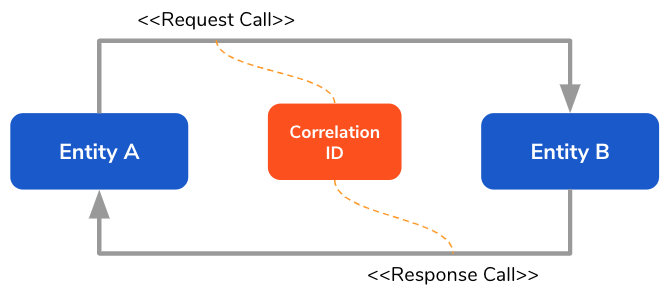
By default, product observability is not enabled as it impacts on the product's performance.
Configure product observability
log4j configs
Follow the steps below to set up the correlation logs related to the database calls.
-
Open the
log4j2.propertiesfile in the<IS_HOME>/repository/confdirectory. -
Append the appender
CORRELATIONto the list of all appenders as follows.appenders = CARBON_CONSOLE, CARBON_LOGFILE, AUDIT_LOGFILE, ATOMIKOS_LOGFILE, CARBON_TRACE_LOGFILE,DELETE_EVENT_LOGFILE, TRANSACTION_LOGFILE, osgi, CORRELATION -
Append the logger
correlationfor the list of all loggers as follows:loggers = AUDIT_LOG, trace-messages, org-apache-coyote, com-hazelcast, Owasp-CsrfGuard,org-apache-axis2-wsdl-codegen-writer-PrettyPrinter, org-apache-axis2-clustering, org-apache-catalina,org-apache-tomcat, org-wso2-carbon-apacheds, org-apache-directory-server-ldap, org-apache-directory-server-core-event, com-atomikos, org-quartz, org-apache-jackrabbit-webdav, org-apache-juddi, org-apache-commons-digester-Digester, org-apache-jasper-compiler-TldLocationsCache, org-apache-qpid, org-apache-qpid-server-Main, qpid-message, qpid-message-broker-listening, org-apache-tiles, org-apache-commons-httpclient, org-apache-solr, me-prettyprint-cassandra-hector-TimingLogger, org-apache-axis-enterprise, org-apache-directory-shared-ldap, org-apache-directory-server-ldap-handlers, org-apache-directory-shared-ldap-entry-DefaultServerAttribute, org-apache-directory-server-core-DefaultDirectoryService, org-apache-directory-shared-ldap-ldif-LdifReader, org-apache-directory-server-ldap-LdapProtocolHandler, org-apache-directory-server-core, org-apache-directory-server-ldap-LdapSession, DataNucleus, Datastore, Datastore-Schema, JPOX-Datastore, JPOX-Plugin, JPOX-MetaData, JPOX-Query, JPOX-General, JPOX-Enhancer, org-apache-hadoop-hive, hive, ExecMapper, ExecReducer, net-sf-ehcache, axis2Deployment, equinox, tomcat2, StAXDialectDetector, org-apache-directory-api, org-apache-directory-api-ldap-model-entry, TRANSACTION_LOGGER, DELETE_EVENT_LOGGER, org-springframework, org-opensaml-xml-security-credential-criteria, org-wso2-carbon-user-core, org-wso2-carbon-identity, org-wso2-carbon-identity-sso-saml, correlation -
Following are the default correlation appender configuration. You can change any of these values using the
log4j2.properties.appender.CORRELATION.type = RollingFileappender.CORRELATION.name = CORRELATIONappender.CORRELATION.fileName =${sys:carbon.home}/repository/logs/correlation.logappender.CORRELATION.filePattern =${sys:carbon.home}/repository/logs/correlation-%d{MM-dd-yyyy}.logappender.CORRELATION.layout.type = PatternLayoutappender.CORRELATION.layout.pattern = %d{yyyy-MM-dd HH:mm:ss,SSS}|%X{Correlation-ID}|%t|%mm%nappender.CORRELATION.policies.type = Policiesappender.CORRELATION.policies.time.type = TimeBasedTriggeringPolicyappender.CORRELATION.policies.time.interval = 1appender.CORRELATION.policies.time.modulate = trueappender.CORRELATION.policies.size.type = SizeBasedTriggeringPolicyappender.CORRELATION.policies.size.size=10MBappender.CORRELATION.strategy.type = DefaultRolloverStrategyappender.CORRELATION.strategy.max = 20appender.CORRELATION.filter.threshold.type = ThresholdFilterappender.CORRELATION.filter.threshold.level = INFO
Enable observability
Follow the steps below to enable product observability.
-
Navigate to the
<IS_HOME>/bindirectory on the command prompt.cd <IS_HOME>/bin -
To set the
-DenableCorrelationLogsproperty totrue, execute the following command.- macOS/Linux
- Windows
sh wso2server.sh -DenableCorrelationLogs=true startwso2server.bat -DenableCorrelationLogs=true startnoteBy default, this property is set to
false. -
Navigate to the
<IS_HOME>/repository/logsdirectory.cd <IS_HOME>/repository/logsNotice that a separate log file called
correlation.logis created.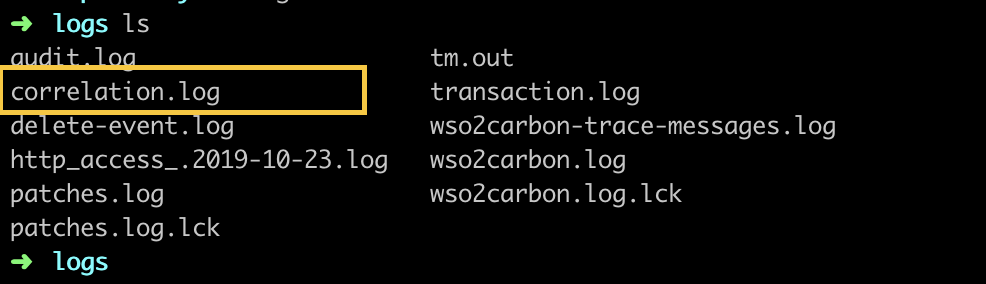
Now you are ready to test the product observability of WSO2 IS.
In order to test product observability, make sure you create a service provider and generate a client key and client secret, with which you can perform a secure database call.
Log patterns
Following are the log patterns that support product observability.
JDBC database call logging
- **Format**
- **Example**
timestamp | correlationID | threadID | duration | callType | startTime | methodName | query | connectionUrl
2018-10-22 17:54:46,869|cf57a4a6-3ba7-46aa-8a2b-f02089d0172c|http-nio-9443-exec-2|4|jdbc|1540211086865|executeQuery|SELECT ID, TENANT_ID, IDP_ID, PROVISIONING_CONNECTOR_TYPE, IS_ENABLED, IS_BLOCKING FROM IDP_PROVISIONING_CONFIG WHERE IDP_ID=?|jdbc:mysql://localhost:13306/apimgtdb?autoReconnect=true&useSSL=false
LDAP database call logging
- **Format**
- **Example**
timestamp | correlationID | threadID | duration | callType | startTime | methodName | providerUrl | principal | argsLengeth | args
2018-10-2310:55:02,279|c4eaede8-914d-4712-b630-73f6534b8def|http-nio-9443-exec-18|19|ldap|1540272302260|search|ldap://localhost:10392|uid=admin,ou=system| ou=Users,dc=wso2,dc=org,(&(objectClass=person)(uid=admin)),javax.naming.directory.SearchControls@6359ae3a
Beginning of the request call
- **Format**
- **Example**
timestamp | correlationID | threadID | duration | HTTP-In-Request | startTime | methodName | requestQuery | requestPath
2018-11-0514:57:06,757|f884a93d-e3a3-431f-a1ea-f6973e125cb6|http-nio-9443-exec-28|0|HTTP-In-Request|1541410026757|GET|null|/carbon/admin/images/favicon.ico
Ending of the request call
- **Format**
- **Example**
timestamp | correlationID | threadID | totalDurationForRequest | HTTP-In-Response | startTime | methodName | requestQuery | requestPath
2018-11-05 14:57:06,764|f884a93d-e3a3-431f-a1ea-f6973e125cb6|http-nio-9443-exec-28|7|HTTP-In-Response|1541410026764|GET|null|/carbon/admin/images/favicon.ico
Read the logs
Let's analyze the following sample log lines to find if there are any timing delays for the JDBC or LDAP calls.
|
|
Advanced scenarios
Following are a few advanced scenarios that are related to product observability in WSO2 IS.
Define denylists for the threads
Certain threads continuously print unnecessary logs. Defining denylists prevents the unwanted threads from printing logs thereby improving the readability of the logs.
Follow the steps below to configure denylists for threads.
-
Open either of the following files in the
<IS_HOME>/bindirectory on a command prompt.- For macOS/Linux:
wso2server.shfile - For Windows:
wso2server.batfile
- For macOS/Linux:
-
Add the following configuration as a system property.
-Dorg.wso2.CorrelationLogInterceptor.blacklistedThreads=threadName1,threadName2 \tipMake sure to add it before the
org.wso2.carbon.bootstrap.Bootstrap $*line.noteThis configuration is not required by default, as all unnecessary threads are already a part of the denylist in the
MessageDeliveryTaskThreadPoolthread. If the above configuration is added, the default value will be overridden. -
Restart the WSO2 IS server.
sh wso2server.sh -DenableCorrelationLogs=true stopsh wso2server.sh -DenableCorrelationLogs=true start -
To send the authentication request, execute the following cURL command.
curl -v -k -X POST --basic -u <CLIENT_KEY>:<CLIENT_SECRET> -H "Content-Type: application/x-www-form-urlencoded;charset=UTF-8" -H "customHeader1:correlationvalue1" -H "customHeader2:correlationvalue2" -d "grant_type=client_credentials" https://localhost:9443/oauth2/tokentipUse the
client keyandclient secretof the service provider you created after enabling product observability. -
Open the
correlation.logon a command prompt and notice the related logs.tail -f <IS_HOME>/repository/logs/correlation.log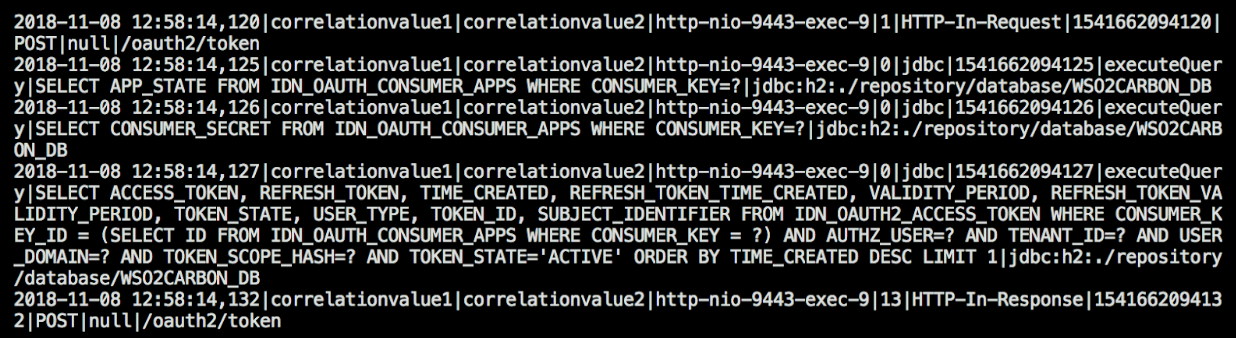
Was this page helpful?