Identity Related Tables
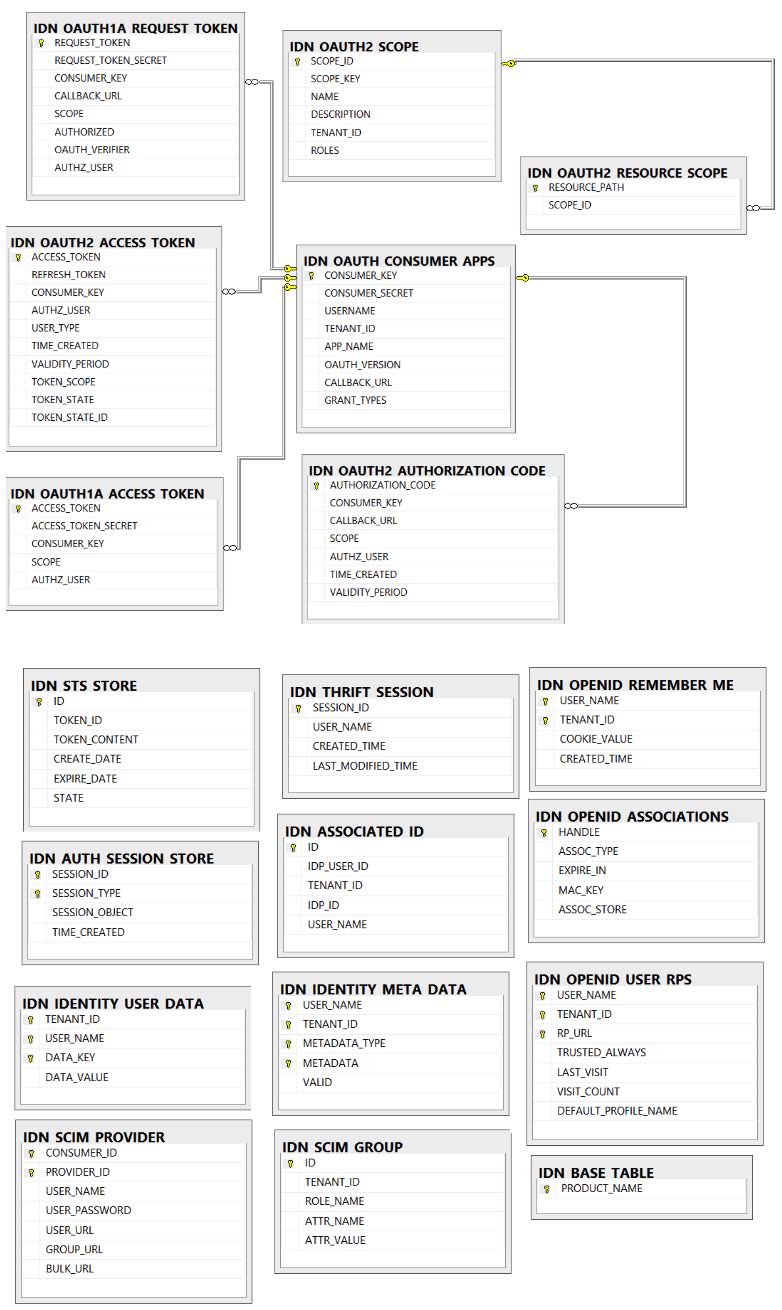
This section lists out all the identity related tables and their attributes in the WSO2 Identity Server database.
IDN_BASE_TABLE
This table is used to provide information related to the server setup.
It has only one column, PRODUCT_NAME, which contains a row with the
value WSO2 Identity Server.
IDN_OAUTH_CONSUMER_APPS
This table is used when adding OAuth/OpenID Connect configuration as the inbound authentication configuration for a service provider. The following table lists out the columns and the values they contain.
| Column | Description |
|---|---|
| CONSUMER_KEY | The OAuth client key |
| CONSUMER_SECRET | The OAuth client secret |
| USERNAME | The username of the user who created the application |
| TENANT_ID | The tenant ID |
| APP_NAME | The name of the service provider |
| OAUTH_VERSION | The supported OAuth version of the application |
| CALLBACK URL | The URL to be redirected to when authorization is complete |
| GRANT_TYPES | All the grant types for the application |
IDN_OAUTH1A_REQUEST_TOKEN
When using OAuth 1.0a, OAuth clients need to send the consumer key,
consumer secret, and scope to the OAuth service and obtain a request
token. When WSO2 Identity Server returns a request token to such a
client, it adds a record to this table. The client will then receive the
request token and the OAuth verifier. The client can send these values
back to the service and obtain the OAuth access token. Then the record
in this table will be deleted and a new row will be added to the
IDN_OAUTH1A_ACCESS_TOKEN table. The following table lists out the
columns and a description of the values it contains.
| Column | Description |
|---|---|
| REQUEST_TOKEN | The generated request token value |
| REQUEST_TOKEN_SECRET | The generated request token secret |
| CONSUMER_KEY | The consumer key of the OAuth application in the service provider |
| CALLBACK_URL | The redirect URL specified for the client in the OAuth application in the service provider |
| SCOPE | The provided scope in the received request |
| AUTHORIZED | True/False (indicates whether the resource owner authorized the request). Initially, this column will be marked as false. |
| OAUTH_VERIFIER | Initially, this column will be NULL. The client application then receives the request token and the request token secret after which it can authorize the request token where the user enters the credentials and authorizes the request. |
| AUTHZ_USER | This is the username of the user that authorized the request token. Once the value of this column is added, the AUTHORIZED column will be marked as true and a random number will be inserted into the OAUTH_VERIFIER column for verification purposes. |
IDN_OAUTH1A_ACCESS_TOKEN
When using OAuth 1.0a and receiving an OAuth 1.0a request token, the client application can obtain the access token by authorizing the request token. The following table lists out the columns and a description of the values it contains.
| Column | Description |
|---|---|
| ACCESS_TOKEN | Randomly generated access token value |
| ACCESS_TOKEN_SECRET | Randomly generated access token secret |
| CONSUMER_KEY | The consumer key of the OAuth application created in the Service Provider |
| SCOPE | The authorized scope |
| AUTHZ_USER | The username of the user who authorized the request token for obtaining the access token |
IDN_OAUTH2_AUTHORIZATION_CODE
When a client application is used with OAuth 2 authorization code grant type, after the authentication, WSO2 Identity Server returns the authorization code to the client. When this occurs, a record is added to this table. The client application can then request the OAuth access token using the authorized code. When the access token is returned, the record with that authorization code is deleted from this table.The following table lists out the columns and a description of the values it contains.
| Column | Description |
|---|---|
| AUTHORIZATION_CODE | The generated authorization code value |
| CONSUMER_KEY | The particular consumer key for which the authorization code was generated. It is used to identify the OAuth application. |
| CALLBACK_URL | The redirect URL of the client for returning the authorization code |
| SCOPE | The approved OAuth scope |
| AUTHZ_USER | The fully qualified username (with the tenant domain) of the user who authorized the application |
| TIME_CREATED | The date and time when the authorization code was generated |
| VALIDITY_PERIOD | The validity time period for the authorization code (default value is 300000 ms) |
IDN_OAUTH2_ACCESS_TOKEN
When an OAuth2 access token is returned to a client, a record will be added to this table. The following table lists out the columns and a description of the values it contains.
| Column | Description |
|---|---|
| ACCESS_TOKEN | The access token |
| REFRESH_TOKEN | The refresh token |
| CONSUMER_KEY | The consumer key of the OAuth application |
| AUTHZ_USER | The fully qualified username (with the tenant domain) of the user who authorized the application |
| USER_TYPE | The type of user |
| TIME_CREATED | The date time value when the access token was generated |
| VALIDITY_PERIOD | The validity period of the token (default is 3600000 ms) |
| TOKEN_SCOPE | The scope of the access token |
| TOKEN_STATE | The state of the access token (ACTIVE) |
| TOKEN_STATE_ID |
IDN_OAUTH2_SCOPE
When WSO2 Identity Server is used with a product such as the WSO2 API Manager, custom OAuth scopes can be defined. The following table lists out the columns and a description of the values it contains.
| Column | Description |
|---|---|
| SCOPE_ID | The unique ID of the scope |
| SCOPE_KEY | A scope key |
| NAME | Name for the scope |
| DESCRIPTION | Description of the scope |
| TENANT_ID | Tenant ID |
| ROLES | List of roles given |
In a standalone WSO2 Identity Server instance, this table will not get populated with data.
IDN_OAUTH2_RESOURCE_SCOPE
When WSO2 Identity Server is used with a product such as WSO2 API
Manager, the custom scopes defined for the APIs will be stored in the
IDN_OAUTH2_SCOPE table. These scopes can be mapped with the resources
in the API and these resources and scopes mapping are stored in this
table. The following table lists out the columns and a description of
the values it contains.
| Column | Description |
|---|---|
| RESOURCE_PATH | The path to the resource |
| SCOPE_ID | The ID of the scope that points to the SCOPE_ID column of the IDN_OAUTH2_SCOPE table |
In a standalone WSO2 Identity Server instance, this table will not get populated with data.
IDN_SCIM_GROUP
When creating a new role in the userstore, the SCIM attributes for the created role are stored in this table. For each role that is created, there are multiple rows stored since multiple SCIM attributes are associated with a role (GROUP). The following table lists out the columns and a description of the values it contains.
| Column | Description |
|---|---|
| ID | |
| TENANT_ID | Tenant ID |
| ROLE_NAME | The name of the role |
| ATTR_NAME | The name of the SCIM attribute |
| ATTR_VALUE | The value of the SCIM attribute |
IDN_SCIM_PROVIDER
This table is not used in the latest version of WSO2 Identity Server.
CONSUMER_IDPROVIDER_IDUSER_NAMEUSER_PASSWORDUSER_URLGROUP_URLBULK_URL
IDN_OPENID_REMEMBER_ME
This table is not used in the latest version of WSO2 Identity Server because the 'Remember Me' feature is handled from the authentication framework.
USER_NAMETENANT_IDCOOKIE_VALUECREATED_TIME
IDN_OPENID_USER_RPS
When users log in to OpenID relying party applications where the OpenID authentication is provided by WSO2 Identity Server, the login details are stored in this table. The following table lists out the columns and a description of the values it contains.
| Column | Description |
|---|---|
| USER__NAME | The username of the logged in user |
| TENANT_ID | Tenant ID of the tenant that the user belongs to |
| RP_URL | The URL of the relying party to which it should be redirected upon successful login |
| TRUSTED_ALWAYS | True/False (indicates whether the user has given the “Approve Always” or “Approve” options of the application for authentication) |
| LAST_VISIT | Date of the last login of the user |
| VISIT_COUNT | The number of successful login attempts for the user |
| DEFAULT_PROFILE_NAME | The default profile name |
IDN_OPENID_ASSOCIATIONS
The OpenID associations are stored in this table. The following table lists out the columns and a description of the values it contains.
| Column | Description |
|---|---|
| HANDLE | The association handle |
| ASSOC_TYPE | The OpenID association type |
| EXPIRE_IN | The datetime value of the expiry of the association |
| MAC_KEY | The Message Authentication Code of the association |
| ASSOC_STORE |
IDN_STS_STORE
When WSO2 Identity Server is used as a Security Token Service which issues access tokens, such records are stored in following table. Following are the columns of the table.
IDTOKEN_IDTOKEN_CONTENTCREATE_DATEEXPIRE_DATESTATE
IDN_IDENTITY_USER_DATA
When using a JDBC userstore, the user attributes of a user are stored
in the UM_USER_ATTRIBUTE table for the supported claims. There are
some claims used for Identity Management features that should be handled
specifically. Claims used for Identity Management feature will be stored
in the userstore which is specified in the
<IS_HOME>/repository/conf/security/identity-mgt.properties
file. The property,
Identity.Mgt.User.Data.Store is used to define what
kind of store it uses to store these reserved claims. Upon updating the
user profile, these claims and their mapped attribute values will be
inserted to this table.
-
If you specify
org.wso2.carbon.identity.mgt.store.UserStoreBasedIdentityDataStorefor theIdentity.Mgt.User.Data.Storeproperty which is the default store, it will use the same userstore where the user resides for storing these special attributes. -
If you specify
org.wso2.carbon.identity.mgt.store.JDBCIdentityDataStorefor theIdentity.Mgt.User.Data.Storeproperty, it will not use the user's userstore and will instead use WSO2 Identity Server's internal JDBC database to store those claims.
The reserved claims are as follows:
-
Any claim that contains the part :
http://wso2.org/claims/challengeQuestionfor its claim URIhttp://wso2.org/claims/challengeQuestion1http://wso2.org/claims/challengeQuestion2http://wso2.org/claims/challengeQuestionUris
-
Any claim that contains part
http://wso2.org/claims/identityfor its claim URIhttp://wso2.org/claims/identity/accountLockedhttp://wso2.org/claims/identity/failedLoginAttemptshttp://wso2.org/claims/identity/unlockTimehttp://wso2.org/claims/identity/passwordTimestamp
The following table lists out the columns and a description of the values it contains.
| Column | Description |
|---|---|
| TENANT_ID | The ID of the tenant to which the user belongs to |
| USER_NAME | The username of the user |
| DATA_KEY | The Claim URI of the supported claim |
| DATA_VALUE | The user attribute value of the particular claim |
IDN_IDENTITY_META_DATA
USER_NAMETENANT_IDMETADATA_TYPEMETADATAVALID
IDN_THRIFT_SESSION
This table is used to store the authenticated thrift session. Once the user is authenticated to the thrift authenticator, it creates a thrift session. This is mainly used in the XACML feature in WSO2 Identity Server. The Entitlement Service of WSO2 Identity Server is exposed via Thrift transport and in order to access this admin service, it must be authenticated. The following table lists out the columns and a description of the values it contains.
| Column | Description |
|---|---|
| SESSION_ID | The unique idea of the created session |
| USER_NAME | The username of the user |
| CREATED_TIME | The time that the session was created |
| LAST_MODIFIED_TIME | The time that the session was last modified |
IDN_ASSOCIATED_ID
Users can associate their social identity (i.e. Facebook, Yahoo, Google, Microsoft ) with the user account created in WSO2 Identity Server. The following table lists out the columns and a description of the values it contains.
| Column | Description |
|---|---|
| ID | |
| IDP_USER_ID | The user's username in the social account (i.e., Facebook username) |
| TENANT_ID | The ID of the tenant in which the user is created |
| IDP_ID | The ID of the identity provider which contains the federated authenticator |
| USER_NAME | The username of the user in WSO2 Identity Server that this social identity is associated with |
IDN_AUTH_SESSION_STORE
When the remember me option is selected when logging in to either a service provider or WSO2 Identity Server, session data is persisted provided that the session data persistence is enabled from configuration. The following table lists out the columns and a description of the values it contains.
| Column | Description |
|---|---|
| SESSION_ID | The unique ID of the session |
| SESSION_TYPE | The type of session created |
| SESSION_OBJECT | The session object |
| TIME_CREATED | The time of the session creation |
Was this page helpful?