Organizations overview
Organizations help you serve multiple businesses from a single platform. Each business gets isolated user management, custom branding, and can even connect their own enterprise identity providers, all while you maintain one application.
Learn the core concepts for managing organizations with WSO2 Identity Server. This guide walks you through organizations, hierarchy, and resource management.
Before you start, familiarize yourself with these core organization terms:
- Root organization - The top-level organization. You create and manage all organizations from here.
- Parent organization - An organization that creates and manages child organizations below it in the hierarchy.
- Child organization - Organizations or sub-units. They can manage their own resources and have an immediate parent above them.
- Shared resources - Resources owned by a parent organization that a child organization can access.
- Inherited resources - Resources automatically available to child organizations from their immediate parent.
- Organization-owned resources - Resources that each organization manages independently.
① What's an organization?
An organization represents one business entity in your system.
Each organization has its own applications, roles, and users. Organizations can customize login pages, branding, and have dedicated administrators with isolated data and configurations.

You run a SaaS platform where businesses sign up to use your software. Each business becomes an organization with its own isolated user management, custom branding, security rules, and can plug in their own enterprise identity provider.
② Organization hierarchy
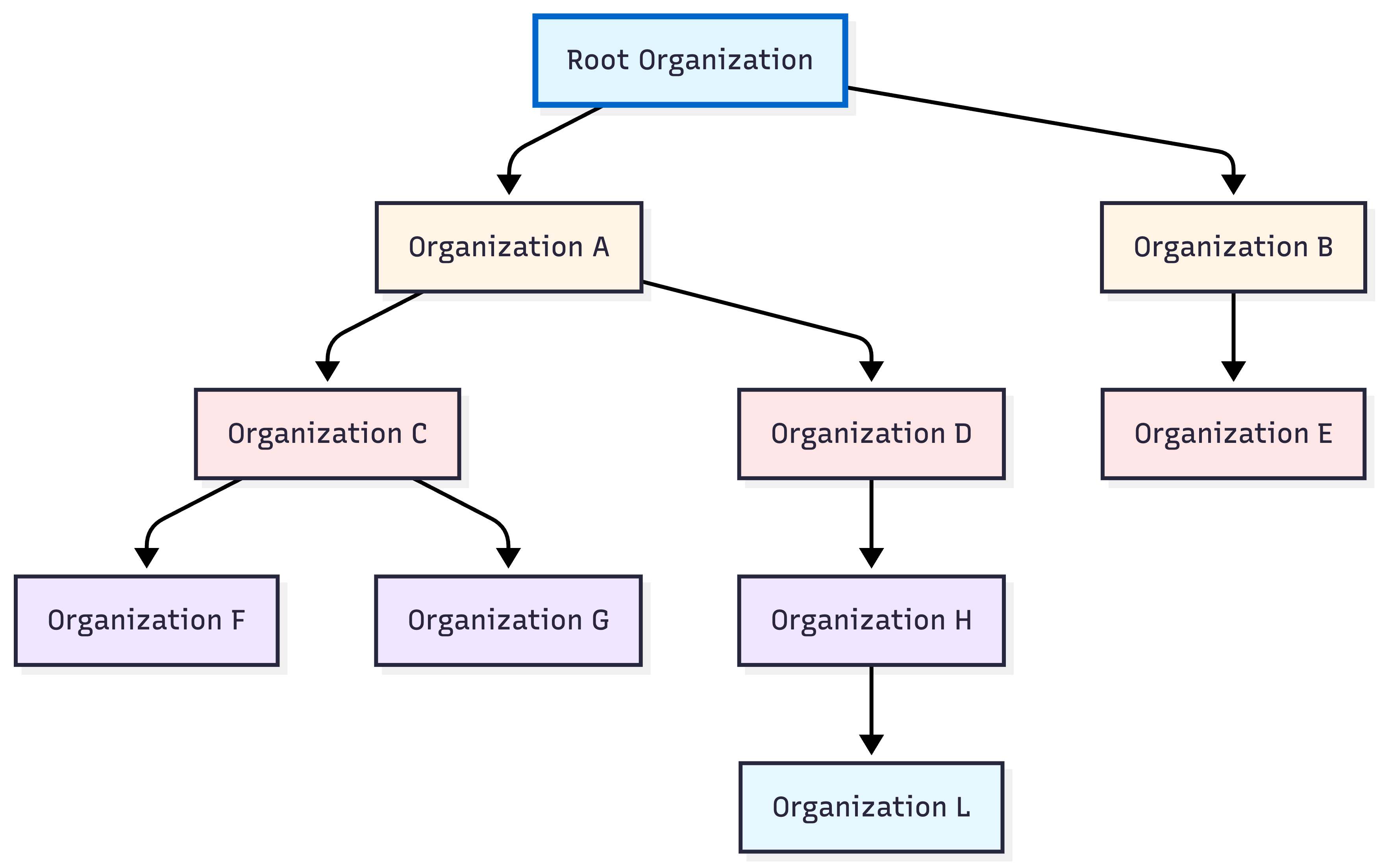
Organizations form a tree structure with parent-child relationships.
The hierarchy structure
Root organization
The top-level organization - This is where you start.
What it does:
- Creates their own child organizations.
- Builds and shares applications.
- Sets hierarchy-vise policies.
Parent organization
Organizations that create child organizations - Any organization within the hierarchy that has children below it.
What it does:
- Creates and manages child organizations.
- Shares resources down the hierarchy.
- Controls access policies for children.
The root organization acts as the top-level parent. Child organizations can also become parents by creating their own children, forming multi-level hierarchies.
Child organization
Organizations created under a parent - Each child has one immediate parent in the hierarchy.
What it does:
- Manages its own applications, roles, and users.
- Customizes login experience.
- Assigns roles to users.
- Can create its own child organizations.
Your SaaS platform (root organization) builds the application and creates child organizations when businesses sign up. A business (parent organization) creates child organizations for their regional offices.
③ Resource behavior across the hierarchy
Use this table to see resource behavior across the hierarchy.
| Share from parent | Organization can create | Organization inherits | |
|---|---|---|---|
| Definition | Resources a parent explicitly shares with child organizations. | Resources an organization creates and manages on its own. | Resources automatically available from the immediate parent. |
| Resources | Applications, Roles (with shared apps), Users | Connections (IdPs), Users, Applications, Groups, Roles, Branding, Templates, Workflows, Userstores, User attributes, Flows, Login and registration customizations, Actions, Adaptive scripts | API resources, Parent branding (when the organization doesn't configure branding), Login and registration settings, Custom claims and OIDC scopes |
You share your SaaS application with a business (shared from parent). The business connects their enterprise IdP and configures custom branding. Their regional offices automatically inherit login settings and API resources.
④ Management APIs vs Organization APIs
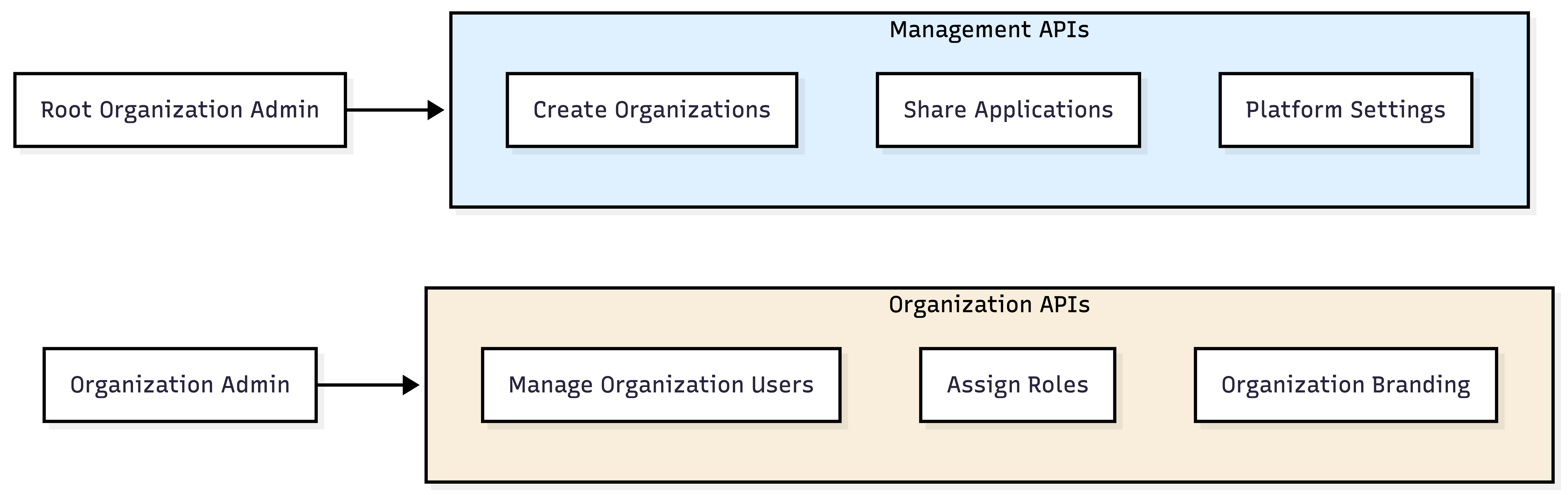
Two API types serve different purposes.
Management APIs
Who uses them: Root organization admins
What they do:
- Create and delete organizations
- Share apps with organizations
- Configure hierarchy-wide resources
You use Management APIs to create organizations when businesses sign up, share your SaaS application with them, and configure platform-wide policies.
POST https://api.example.com/management/v1/organizations
Organization APIs
Who uses them: Organization admins
What they do:
- Manage organization users
- Assign roles within the organization
- Configure organization settings
A business admin uses Organization APIs to add employees, configure their enterprise IdP, assign roles, and customize settings, all without contacting you.
POST https://api.example.com/o/{org-id}/users
Quick comparison
| Feature | Management API | Organization API |
|---|---|---|
| Access | Root Organization admins only | Organization admins |
| Use case | Platform management | Organization resource management |
⑤ Putting it all together
Here's how everything connects with organizations:
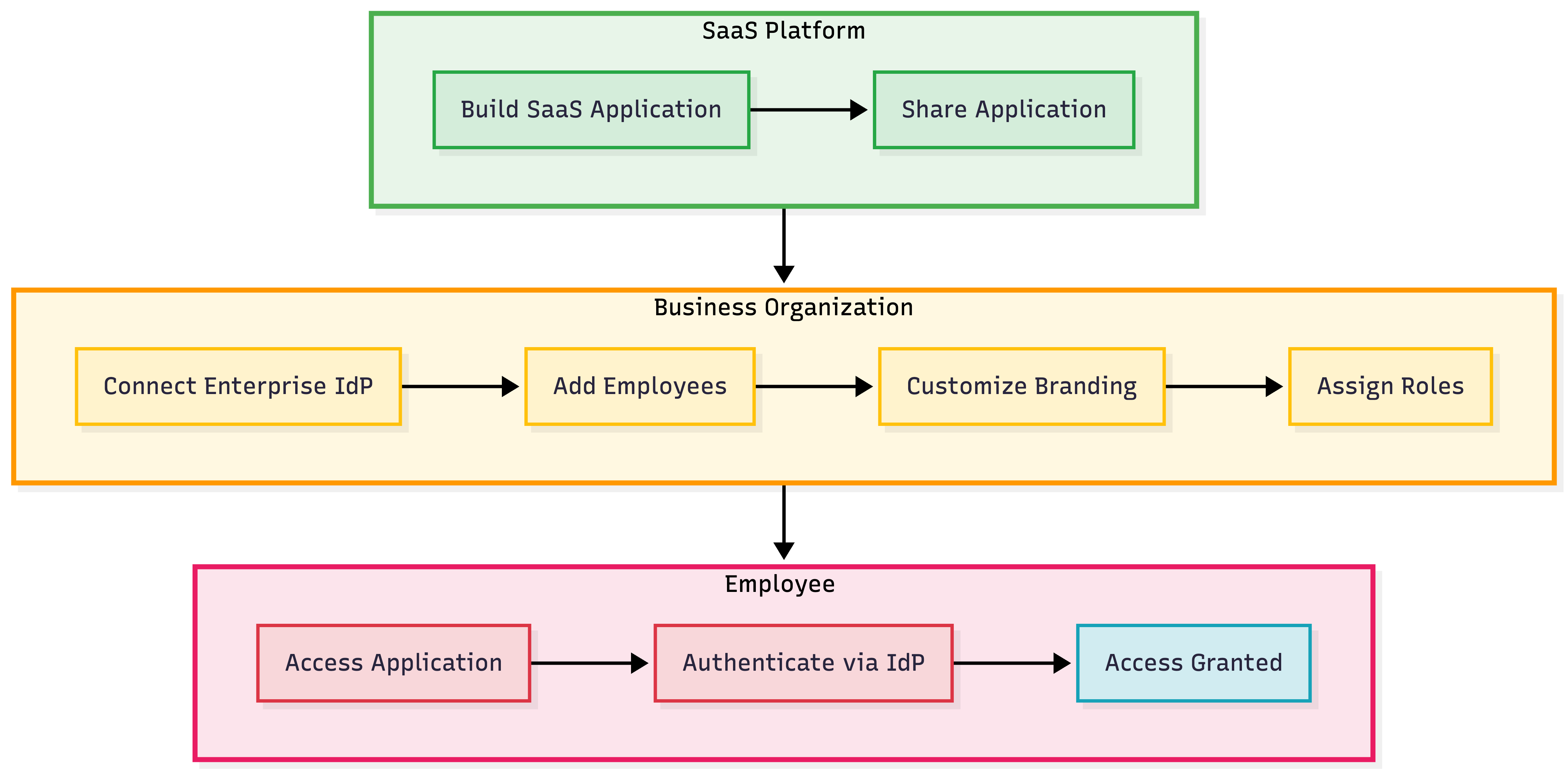
The organization flow:
- You: Build your SaaS application in the root organization
- You: Share the application with other businesses (child organizations)
- Businesses: Connect their enterprise IdP and add employees
- Businesses: Customize branding and assign roles to control access
- Employees: Log in using their enterprise credentials through their organization
Next steps
Ready to build? Start here:
- Create and manage organizations
- Share applications with organizations
- Set up organization administration
- Try a complete organization use case
Was this page helpful?