Message Filter
Use the Message Filter pattern to evaluate each incoming message and continue the flow only for messages that satisfy the selected condition. Enterprise Integration Patterns Message Filter reference
The pattern is implemented by placing a filtering construct at the point where the integration has enough context to decide whether a message should continue. Use flow-level constructs when the decision depends on data the integration reads or derives. Use boundary or source-level constructs when the decision can be made from metadata or delivery rules before the main processing path starts.
Predicate-based filtering
Use predicate-based filtering with if/else statements when each message carries the fields needed for a single boolean decision, such as priority, source, header, or status. The accepted path contains the forwarding or processing action. The rejected path does nothing or handles the rejection separately.
- Visual Designer
- Ballerina Code
- Open the flow and add a step.
- Add an If node at the point where the message has enough data for the decision.
- Set the condition to
message.priority == HIGH_PRIORITY. - Add the accepted action inside the matching branch.
- Leave the other branch empty when unmatched messages should be discarded.
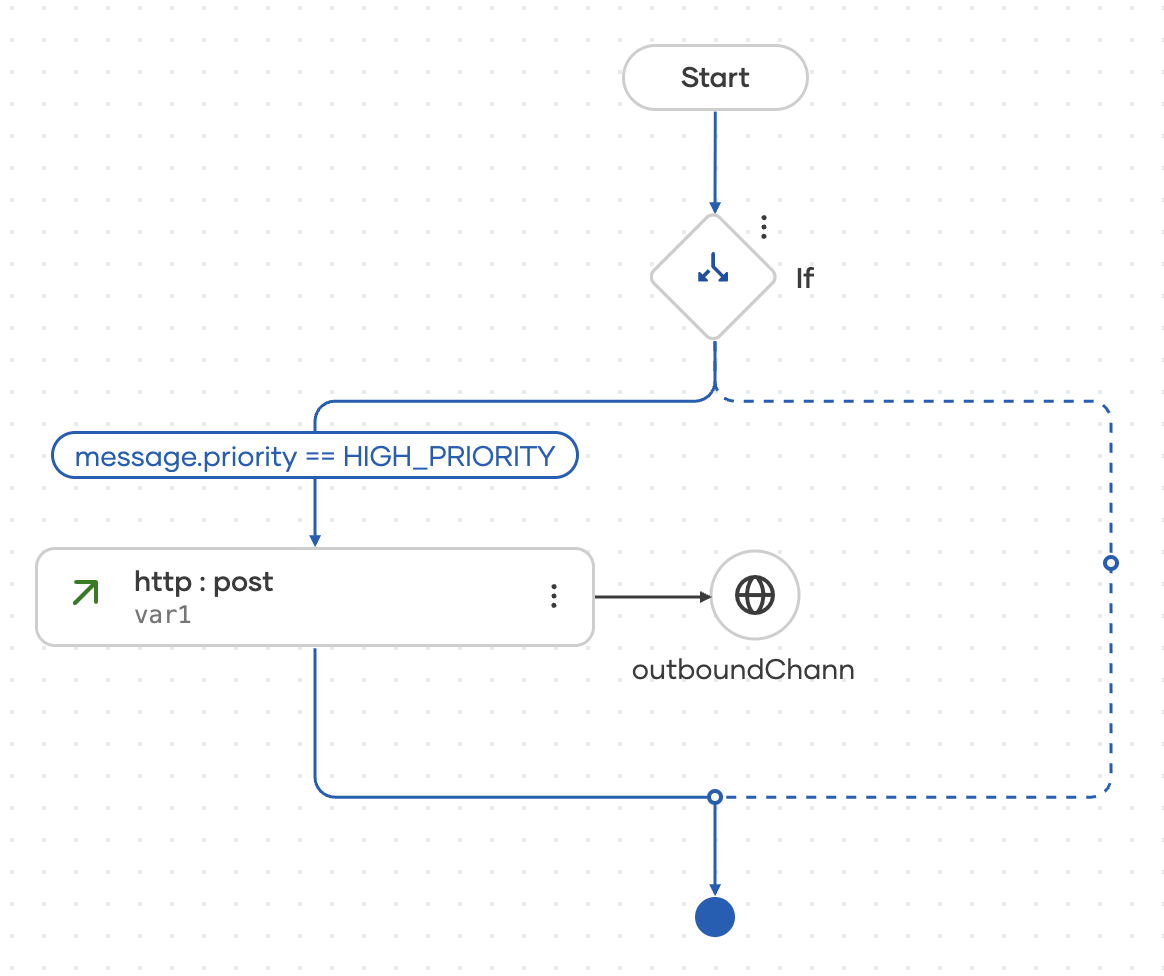
// docs-fold-start: Supporting definitions
import ballerina/http;

const HIGH_PRIORITY = 1;
const MEDIUM_PRIORITY = 2;
const LOW_PRIORITY = 3;

type Message record {|
    string id;
    string source;
    string subject;
    HIGH_PRIORITY|MEDIUM_PRIORITY|LOW_PRIORITY priority;
|};

final http:Client outboundChannel = check new ("http://api.outbound.channel.com.balmock.io");
// docs-fold-end

service /api/v1 on new http:Listener(8080) {
    resource function post message(Message message) returns error? {
        if message.priority == HIGH_PRIORITY {
            _ = check outboundChannel->/messages.post(message, targetType = http:Response);
        }
    }
}
Collection-level filtering
Use collection-level filtering with query expressions when the flow already has a group of messages or records and only a subset should continue. Keep the predicate in the where clause so the result is the accepted collection.
- Visual Designer
- Ballerina Code
- Open the flow and add a step.
- Add a Map Data or Declare Variable step.
- Set the output type to the accepted collection type, such as
Message[]. - Enter a query expression with a
whereclause for the filter predicate. - Use the resulting collection in the next processing or forwarding step.
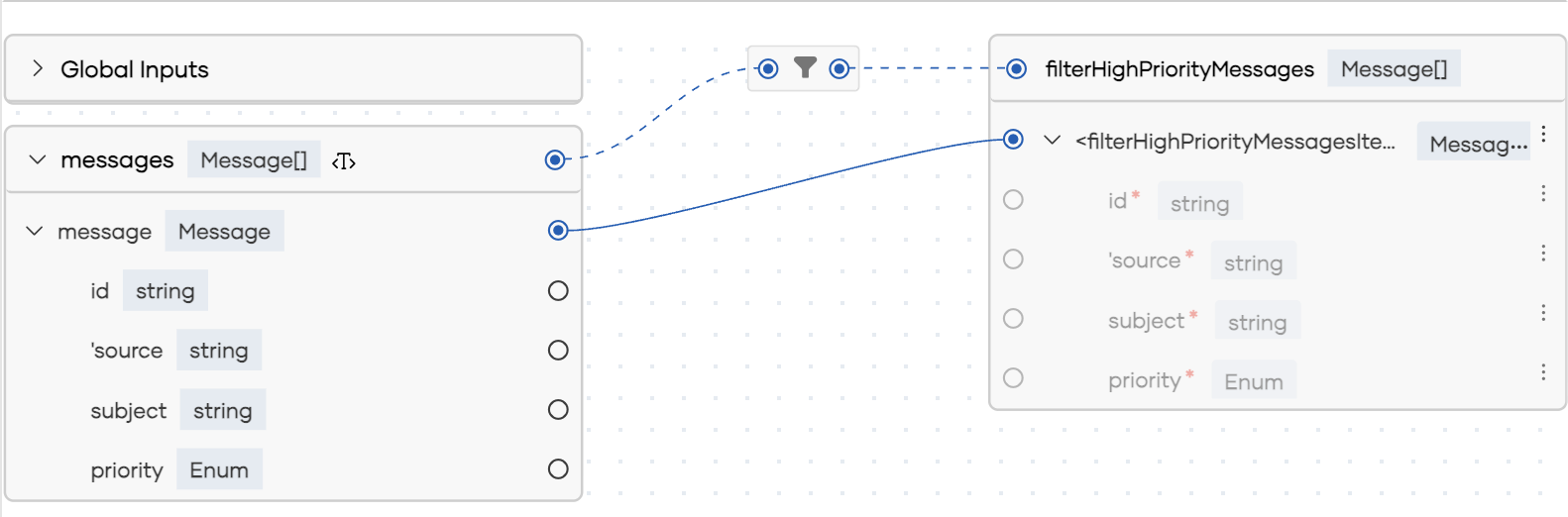
// docs-fold-start: Supporting definitions
const HIGH_PRIORITY = 1;
const MEDIUM_PRIORITY = 2;
const LOW_PRIORITY = 3;

type Message record {|
    string id;
    string source;
    string subject;
    HIGH_PRIORITY|MEDIUM_PRIORITY|LOW_PRIORITY priority;
|};
// docs-fold-end

function filterHighPriorityMessages(Message[] messages) returns Message[] {
    return from Message message in messages
        where message.priority == HIGH_PRIORITY
        select message;
}
Boundary-level filtering
Use boundary-level filtering when the input artifact can reject or route messages before custom flow logic runs. For HTTP-facing inputs, use a request interceptor when the decision can be made from request metadata before the resource executes. Other inputs can use their own handler, listener, or subscription selection points.
- Visual Designer
- Ballerina Code
- Add the source artifact, such as an HTTP service.
- Add a request interceptor for the service boundary.
- Read the request metadata needed for the filter, such as a priority header.
- Return a response for messages that should stop at the boundary.
- Call the next service only for messages that should enter the resource flow.
// docs-fold-start: Supporting definitions
import ballerina/http;

type OrderCreated record {|
    string id;
    string priority;
|};

function processOrder(OrderCreated event) returns error? {
}
// docs-fold-end

listener http:Listener eventListener = new (8080,
    interceptors = [new HighPriorityFilter()]
);

service class HighPriorityFilter {
    *http:RequestInterceptor;

    resource function 'default [string... path](
            http:RequestContext ctx, http:Request req)
            returns http:NextService|http:Accepted|error? {
        if !req.hasHeader("x-priority") {
            return <http:Accepted>{body: {status: "filtered"}};
        }

        string priority = check req.getHeader("x-priority");
        if priority != "high" {
            return <http:Accepted>{body: {status: "filtered"}};
        }

        return ctx.next();
    }
}

service /events on eventListener {
    resource function post orders(OrderCreated event) returns error? {
        check processOrder(event);
    }
}
Broker-side delivery filtering
Use broker-side delivery filtering when RabbitMQ can reduce what reaches the flow before consumption. Route matching messages into a dedicated queue with a direct exchange and binding key, then configure the RabbitMQ trigger to consume only that queue. Use RabbitMQ exchange bindings to bind the accepted-message queue to the exchange with the accepted routing key.
- Visual Designer
- Ballerina Code
- Add the RabbitMQ event integration.
- Configure the RabbitMQ trigger connection with the broker host and port.
- Set Queue Name to the queue that receives accepted messages, such as
high-priority-orders. - Create the RabbitMQ broker resources with connector actions or broker administration: declare a direct exchange, declare the accepted-message queue, and bind the queue to the exchange with the accepted routing key.
- Publish messages to that exchange with the routing key that matches the accepted binding key, such as
orders.priority.high. - Add processing steps only for messages delivered to the accepted-message queue.
// docs-fold-start: Supporting definitions
import ballerinax/rabbitmq;

configurable string rabbitmqHost = "localhost";
configurable int rabbitmqPort = 5672;
const ORDERS_EXCHANGE = "orders.events";
const ACCEPTED_ORDERS_QUEUE = "high-priority-orders";
const ACCEPTED_ORDERS_BINDING_KEY = "orders.priority.high";

listener rabbitmq:Listener rabbitmqListener = check new (rabbitmqHost, rabbitmqPort);
rabbitmq:Client rabbitmqClient = check new (rabbitmqHost, rabbitmqPort);

function configureBrokerDeliveryFilter() returns error? {
    check rabbitmqClient->exchangeDeclare(ORDERS_EXCHANGE, rabbitmq:DIRECT_EXCHANGE, config = {
        durable: true
    });
    check rabbitmqClient->queueDeclare(ACCEPTED_ORDERS_QUEUE, config = {
        durable: true
    });
    check rabbitmqClient->queueBind(ACCEPTED_ORDERS_QUEUE, ORDERS_EXCHANGE, ACCEPTED_ORDERS_BINDING_KEY);
}

function processOrder(rabbitmq:AnydataMessage message) returns error? {
}
// docs-fold-end

@rabbitmq:ServiceConfig {
    queueName: ACCEPTED_ORDERS_QUEUE
}
service rabbitmq:Service on rabbitmqListener {
    remote function onMessage(rabbitmq:AnydataMessage message) returns error? {
        check processOrder(message);
    }
}
Was this page helpful?