Simple Setup
Receiving continuous updates to your environment can be done with ease using WSO2 recommended configuration management tools, which are Puppet and Ansible.
listed below are the steps:
-
Go to the desired git repository location of the selected configuration management tool. [e.g., Let say we are using WSO2 APIM with ansible as the configuration management tool, thus the git repo to refer is
https://github.com/wso2/ansible-apim] -
Clone the correct git repo.
-
Check out the latest tag of the product version.
git checkout <version of the latest tag>infoThe above command will be like
git checkout v2.6.0.7for the latest WSO2 APIM 2.6.0 version.
-
Store the product pack you've downloaded in the
/files/packsdirectory. -
Move to the
scriptsdirectory and run theupdate.shin the main node.cd scripts./update.sh -
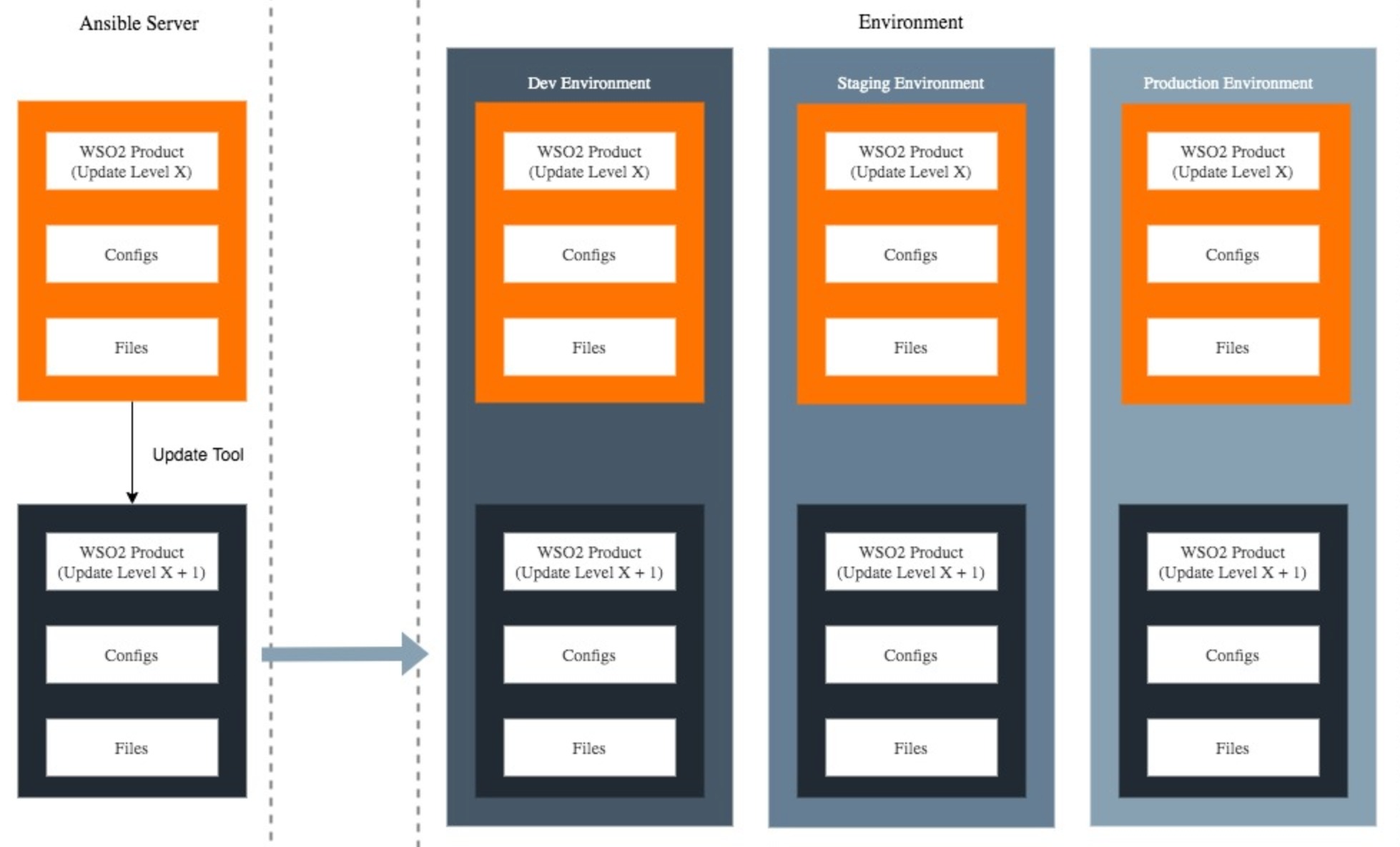
After the product is updated, propagate the updated product pack to the relevant environments. (i.e. Development, Staging and Production)
Refer the following diagram for a better understanding on continuous updates:
For more detailed information on WSO2's Puppet and Ansible configurations, refer the link.
Was this page helpful?