Invite user to set password
You're reading Identity & Access Management 7.1.0. The newest release is 7.3.0, and Cloud has the newest features. Go to the newest release
Allow administrator to invite users to set their own passwords during the onboarding process in WSO2 Identity Server.
Configuration instructions
For inviting users to set their password, follow these instructions:
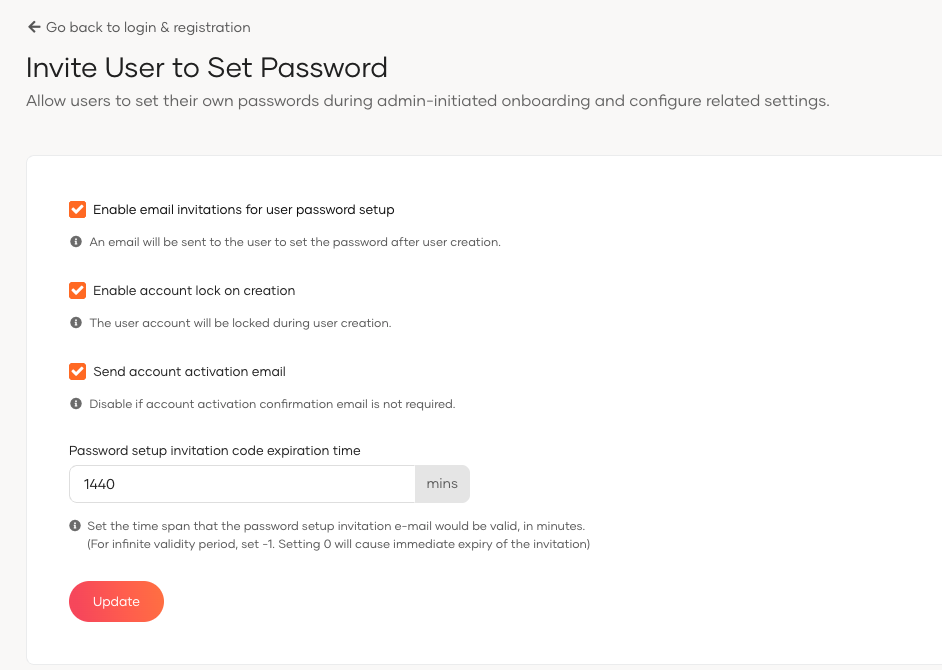
- On the WSO2 Identity Server Console, go to Login & Registration > User Onboarding > Invite User to Set Password.
- Check the Enable email invitations for user password setup to send an email to the user to set the password after user creation.
- Select the Enable account lock on creation to lock the user account during user creation.
- If you want to send an account activation confirmation email, enable the Send account activation email.
- Set the Password setup invitation code expiration time in minutes to define how long the password setup invitation e-mail would be valid. For infinite validity period, set -1. Setting 0 will cause immediate expiry of the invitation.
- Click Update to save the changes.
Parameters
| Parameter | Description |
|---|---|
Enable user email verification | Triggers a verification notification during user creation if enabled. |
Enable account lock on creation | Locks the user account during creation to prevent unauthorized access. |
Send account activation email | Sends an email to users for account activation if enabled. |
Password Setup Invitation Code Expiration Time | Defines the validity period in minutes for the password setup code sent to users. For infinite validity period, set -1. |
Was this page helpful?