Secure app-native authentication flows
In App-Native Authentication, users input their credentials directly into the application. Hence, malicious applications mimicking the legitimate application may be able to capture user credentials. You can implement the following mechanisms to secure authentication requests.
Add app-native authentication to your application.
While these mechanisms are only applicable for the initial authentication request, all subsequent requests are bound to it via a unique identifier (flowId), which prevents alterations during the process.
Using client attestation
If the application is hosted either in the Apple App Store or the Google Play Store, follow the steps below to leverage the attestation services provided by these platforms to verify the legitimacy of the client.
-
On the WSO2 Identity Platform Console, go to Applications.
-
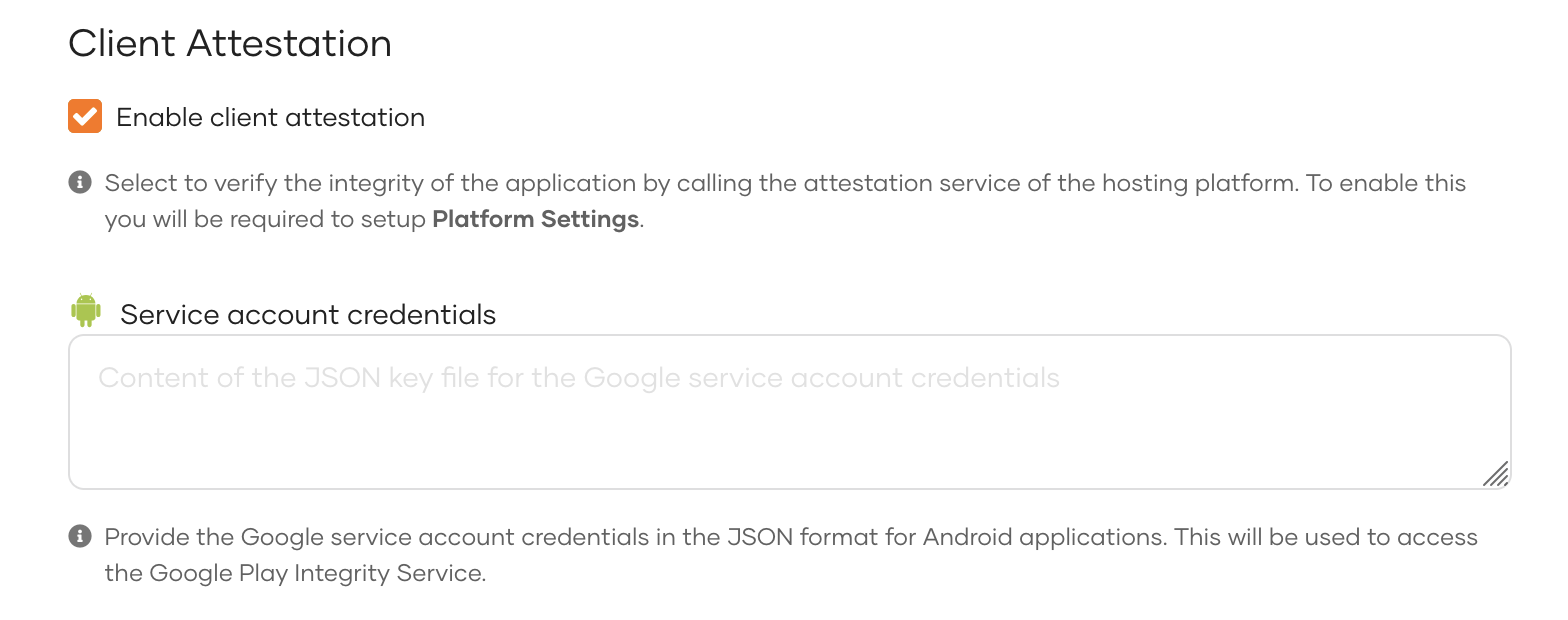
Go to the Advanced tab of your application and under Client Attestation section, select Enable client attestation.
-
For Android applications, provide the service account credentials.
 note
Learn more about service account credentials.
-
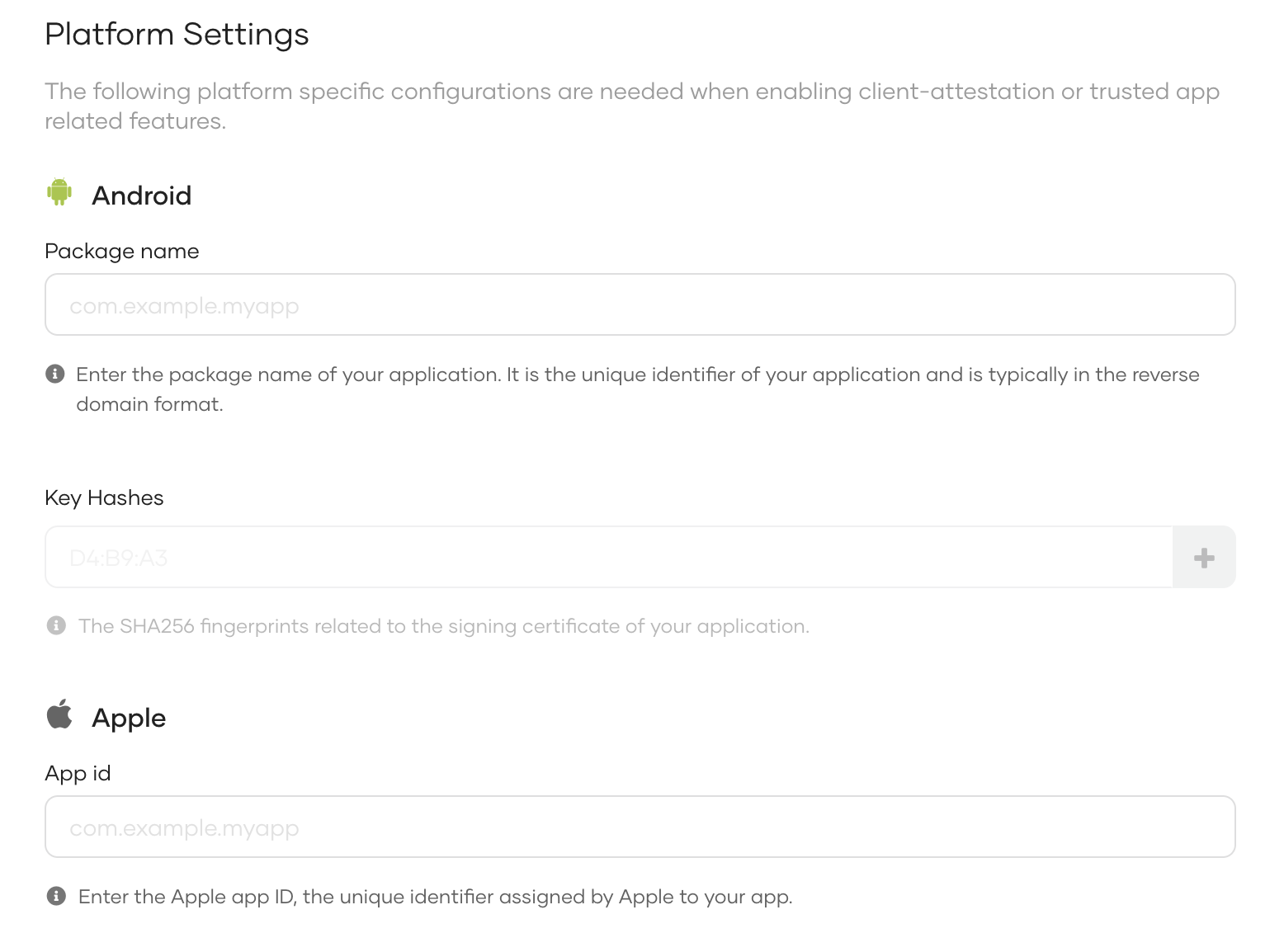
Provide the platform-specific application details under Platform Settings.
a. For android:
tipBy leveraging the Google Play Integrity API, WSO2 Identity Platform ensures a heightened level of security for Application Native Authentication. It actively detects and responds to potential threats, thereby safeguarding against attacks and mitigating the risk of abuse. Learn more about the Play Integrity API.
- Provide the package name of the application which takes the format of the reverse domain format (e.g. com.example.myapp)
b. For apple:
tipBy leveraging DCAppAttestService, WSO2 Identity Platform adds an extra layer of security to Application Native Authentication for iOS apps. It actively detects and responds to potential threats, safeguarding against unauthorized access and malicious activities. Learn more about Apple's DeviceCheck Attest Service
- Provide the app ID of your application which consists of the Team ID and the bundle ID separated by a period (.). (e.g. A1B2C3D4E5.com.domainname.applicationname)
-
Click Update to save the changes.
The client application should retrieve the attestation object (for iOS) or the integrity token (for Android) from the respective platform and pass it to WSO2 Identity Platform via the x-client-attestation header in the initial authentication request.
- Sample request
- Example
curl --location 'https://api.asgardeo.io/t/{organization_name}/oauth2/authorize/'
--header 'x-client-attestation: <attestation_object>'
--header 'Accept: application/json'
--header 'Content-Type: application/x-www-form-urlencoded'
--data-urlencode 'client_id=<client_id>'
--data-urlencode 'response_type=code'
--data-urlencode 'redirect_uri=<redirect_uri>'
--data-urlencode 'scope=<scope>'
--data-urlencode 'response_mode=direct'
curl --location 'https://api.asgardeo.io/t/bifrost/oauth2/authorize/'
--header 'x-client-attestation: eyJhbGciOiJBMjU2S1ciLCJlbmMiOiJBMjU2R0NNIn0.O1miRMXle8A4hLH46VkxHgdU9i1-ow...'
--header 'Accept: application/json'
--header 'Content-Type: application/x-www-form-urlencoded'
--data-urlencode 'client_id=XWRkRNkJDeTiR5MwHdXROGiJka'
--data-urlencode 'response_type=code'
--data-urlencode 'redirect_uri=https://example.com/home'
--data-urlencode 'scope=openid profile'
--data-urlencode 'response_mode=direct'
Using client authentication
Confidential clients that are able to securely store a secret can make use of client authentication to secure authentication requests.
The initial authentication request is an OAuth 2.0 authorization request. Therefore, any supported authentication mechanism for an OAuth confidential client can be used to secure this request. There are no additional configurations required to enable client authentication. The application can also initiate the request as a Pushed Authorization Request (PAR).
The following is a sample request using client secret based authentication.
- Sample request
- Example
curl --location 'https://api.asgardeo.io/t/{organization_name}/oauth2/authorize/'
--header 'Authorization: Basic <base64encoded(client_id:client_secret)>'
--header 'Accept: application/json'
--header 'Content-Type: application/x-www-form-urlencoded'
--data-urlencode 'client_id=<client_id>'
--data-urlencode 'response_type=code'
--data-urlencode 'redirect_uri=<redirect_uri>'
--data-urlencode 'scope=<scope>'
--data-urlencode 'response_mode=direct'
curl --location 'https://api.asgardeo.io/t/bifrost/oauth2/authorize/'
--header 'Authorization: Basic WFd4N0RlVGlSNU13SGRYUk9HaUprYTpmVDlCN0RJTGZ3MWZVUmpQRVpHOG9fWFA4Q20ySFFQOEhBclJFhNYQ=='
--header 'Accept: application/json'
--header 'Content-Type: application/x-www-form-urlencoded'
--data-urlencode 'client_id=XWRkRNkJDeTiR5MwHdXROGiJka'
--data-urlencode 'response_type=code'
--data-urlencode 'redirect_uri=https://example.com/home'
--data-urlencode 'scope=openid profile'
--data-urlencode 'response_mode=direct'
Was this page helpful?